Showing posts with label Google Suggest. Show all posts

Monday, July 12, 2010

Google Suggest as a Context-Sensitive Spell Checker

This is one of the most useful features released by Google this year. Google Suggest, which usually auto-completes your query as you type, is now also a spell-checker. Even if Google can't find popular queries that start with the words you've typed, it will still show a "did you mean" entry that corrects your spelling mistakes.

The most impressive thing about this feature is that the spell checker is context-sensitive, so the suggestions are actually relevant. It's likely that Google uses the smart spell checker from Google Wave.

If you type [this is a rlly], Google suggests that [this is a rally] is more appropriate. Most browsers offer the same suggestion. If you type another word and your query is [this is a rlly beautiful], Google shows a different suggestion: [this is a really beautiful].


Type [Why its so important too eat hole grains] in a text field from a web page and your browser won't find any spelling mistakes. Not even Gmail's spell checker can find the mistakes. That's because most applications use dictionaries to find the words that are spelled incorrectly. Google Suggest is smarter because it tries to find if the words make sense in the context of your query.

Monday, June 7, 2010

Spelling Corrections in Google Suggest

Google Suggest has already been detecting misspellings and showing suggestions that include the properly spelled keywords, but now the mistakes are easier to spot. If you type a misspelled query, Google Suggest includes the "did you mean" label.

"These spelling suggestions already exist on the results page, but by moving them to an earlier point in the search process, we hope we've made it faster and easier to get to the results you're looking for. Right now, this feature is offered only for google.com in English, but we're working to roll this out internationally in the near future," explains Google.


A Wall Street Journal article listed some of the most commonly misspelled words in Google and other search engines: "Criagslist" instead of "Craigslist", "Facebok" instead of "Facebook", "definately", "definetly" or "definatly" instead of "definitely", "stilletos" or "stillettos" instead of "stilettos", "mischevious" and "mischievious" instead of "mischievous". Yahoo's most misspelled word of 2010 so far was Eyjafjallajokull, the famous volcano in Iceland that erupted this year.

Wednesday, April 21, 2010

More Suggestions in Google Maps

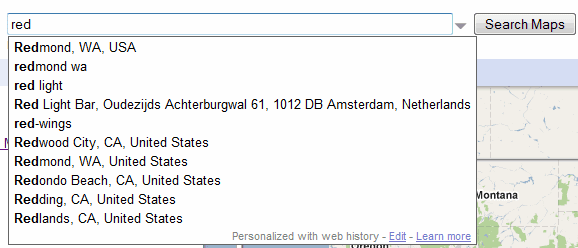
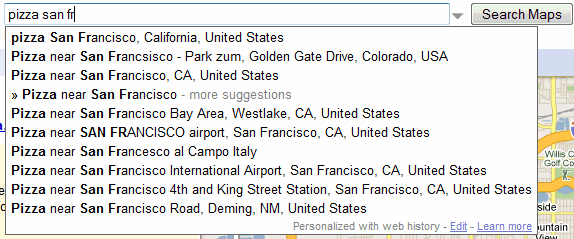
Google Maps no longer shows suggestions only from your recent searches. When you start typing a query, Google Maps shows popular locations, searches and local businesses. For example, you can type "red" and the first suggestion is "Redmond, WA, USA".


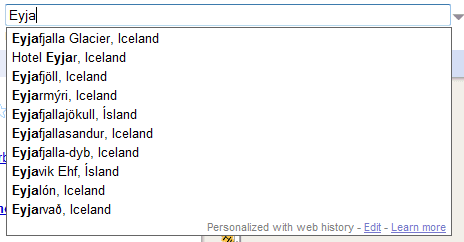
The suggestions are helpful if you want to type a complicated name like Eyjafjallajökull and you only remember the first letters, but Google doesn't do a great job at ranking the list of suggestions.


The autocomplete feature from Google Maps is the first implementation of Google Suggest that uses HTTPS. Google Maps continues to show personalized suggestions from Google Web History, a feature that has replaced Saved Locations.

Monday, March 15, 2010

Google Book Search's Irrelevant Suggestions

You probably noticed that Google's search services show different suggestions. For example, when you type "us" in Google Image Search, the first suggestion is "us map". Typing "us" in Google Web Search doesn't return the same suggestion: "us bank" is more popular. It makes sense to restrict the suggestions to queries that are popular in each specialized search engine because they're actually relevant.

Google Book Search seems to be the only Google service that shows irrelevant suggestions. When you type "shak", the top suggestions are "shakira" and "shake weight", even if "shakespeare" would be much more appropriate. Obviously, Google uses suggestions from the web search engine and "Shakira" is a more popular query than "Shakespeare".


"Suit the action to the word, the word to the action." (Hamlet)

Sunday, March 7, 2010

Exploring Google Suggest

What Do You Suggest? is a site that lets you visually explore how Google Suggest autocompletes a query. "What Do You Suggest takes a seed from you, then guides you on a journey through language and the collective lives of Google users."


Simon Elvery, who created the site, found a lot of interesting patterns:
There are some recurring themes which have emerged as I've been playing with the site during its creation. Among other things, it seems people do rather a lot of searching on the topics of music, religion and relationships.

Sometimes the results are sad, like the people searching for free ebooks on relationships for dummies, and sometimes hopeful like looking for love.

Health is also a recurring theme with the names of medicines, diseases and symptoms appearing over and over again.

{ via Information Aesthetics }

Sunday, December 20, 2009

Funny Google Suggestions

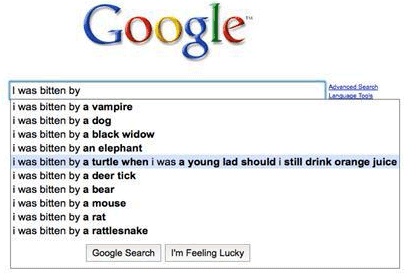
When you start to type a query, Google suggests popular search terms that include your keywords. Sometimes the suggestions are surprising, especially when the suggested queries are long and descriptive. A suggestion like [i was bitten by a turtle when i was a young lad should i still drink orange juice] might surprise you if you didn't know that it was a question on Yahoo Answers that became famous.


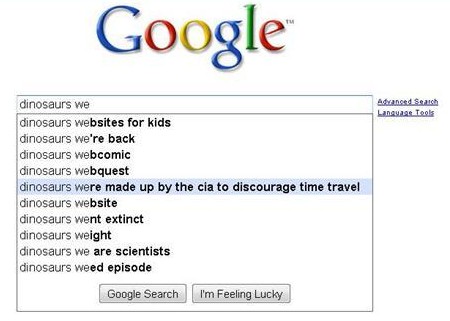
Other suggestions could be popular songs, movie quotes or Internet memes. For example, [Dinosaurs were made up by the CIA to discourage time travel] is the name of a song.


The two examples are from Autocomplete Me, a site that collects funny Google suggestions and lets you rate them.

Tuesday, December 15, 2009

Google Smart Suggest

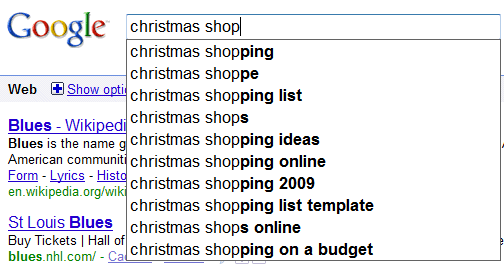
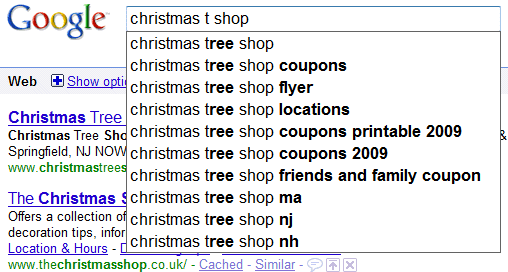
Google has recently added a feature that makes search suggestions even more useful. Let's say you type [christmas shop] and then you realize that you wanted to search for [christmas tree shop]. You don't have to add the word "tree" to your query: just type "t" before "shop" and Google adjusts the suggestions. The first suggested query is [christmas tree shop].


The change may seem subtle, but I think it's really significant: Google takes into account the caret position and shows suggestions for the word you are currently typing.

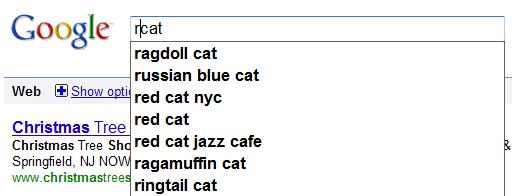
Here's another way to use smart suggestions: type "cat" in the search box, then type "r" before "cat". The first suggestion is [ragdoll cat], a popular query starts with "r" and includes the word "cat".


Yet another reason to use Google's search box instead of typing a query in your browser's search box.

Friday, December 11, 2009

Instant Answers in Google Suggest

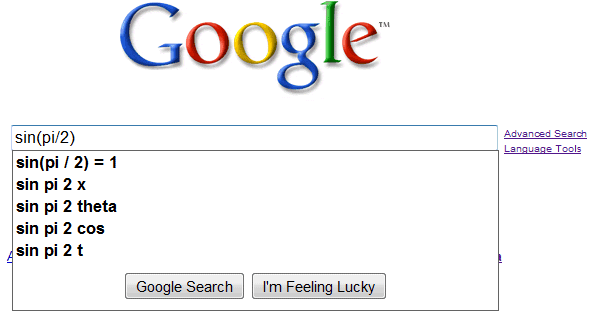
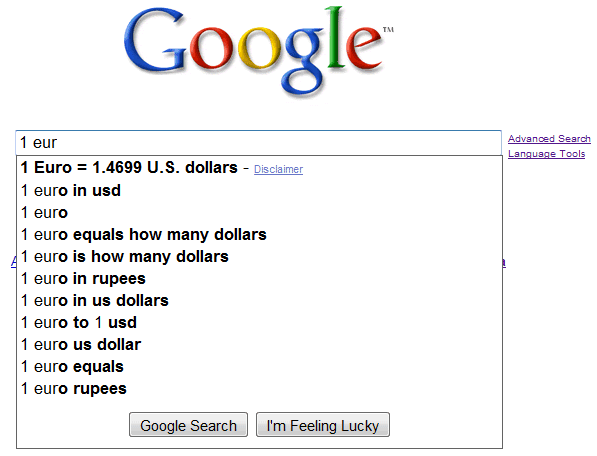
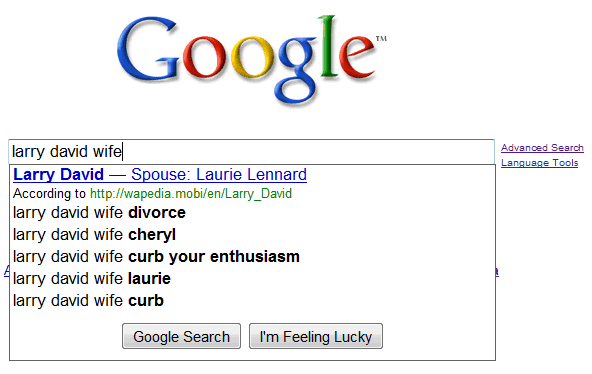
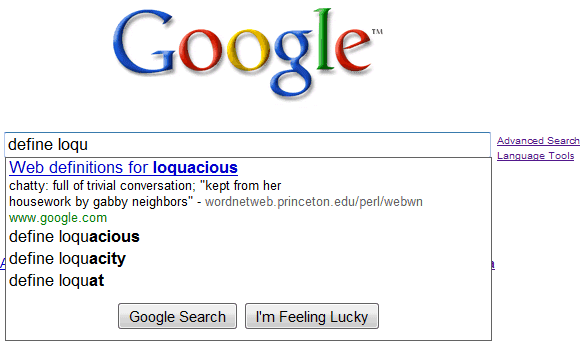
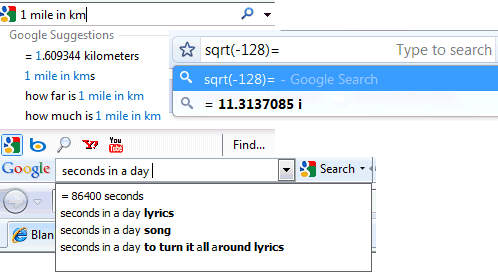
Google's search suggestions started to include instant answers for Math calculations, unit conversions, currency conversions, weather information, simple facts, local time, package tracking, word definitions and more. That means you no longer have to click the search button and open a new page to see the results: the answers are displayed instantly.

"This kind of information will appear in Suggest either above or below the suggested search terms for a variety of queries. For example, you can type "delta 140" to see the flight status. You can also quickly discover the current time, figure out how many Euros you'll get per dollar, or even brush up on metric conversions," explains Google.


My only issue is that Google's answers can't be copied. If you try to select the suggestion, you'll notice that the answer is not added to the search box, so the only way to copy the result is to open the search results page.

Some of the instant answers are available even if you don't use Google's homepage: check the search suggestions from Firefox, Chrome, IE 8 and Google Toolbar.


Wednesday, September 2, 2009

Google Product Search Suggestions

Google's product search engine started to show suggestions when you type a query. The suggestions are obtained by comparing your partial query with popular searches.


After typing a query or selecting one from the list of suggestions, you can use the options displayed at the bottom of the page to filter the results by price, category, brand, store and seller's rating.

Monday, August 31, 2009

Google News Suggest

After showing suggestions for web search, image search and video search, Google started to autocomplete your queries in Google News. The suggestions are related to current news, so you don't have to type too many letters to find the latest stories about Opera 10, Walt Disney or Hurricane Jimena.


The interface makes it difficult to select suggestions using a keyboard, since you have to press "Enter" twice to perform a search, but this bug will probably be fixed. Another problem is that you can't disable suggestions by visiting the preferences page and selecting "Do not provide query suggestions in the search box".

Sunday, August 9, 2009

Contextual Google Suggestions

Google shows different search suggestions, depending on your actions. If you type some keywords in the search box, you'll usually see suggestions that start with your keywords.


After performing the search, Google will show a new type of suggestions that include your keywords, but not necessarily as a prefix. Google assumes that you're not happy with the search results and you're trying to find a query that returns better search results.

Thursday, May 21, 2009

Ads in Google Suggest

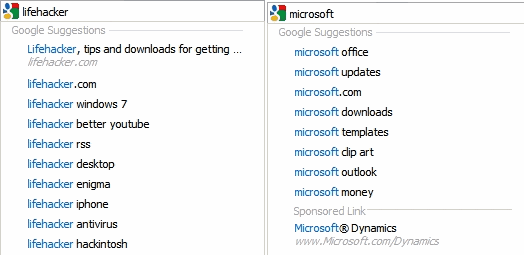
Google Suggest has been recently updated to include top search results and search buttons, but the most surprising additions are sponsored links. Here's how Google explains why you'll sometimes see ads below the suggestions:

"Similar to the navigational suggestions, sometimes we detect that the most relevant completion for what you're typing is an ad. When an ad is shown, we mark it with the text "Sponsored Link" and a colored background, as on the results page."


The updated Google Suggest will have an interesting side-effect: you'll see the search results pages less often. Google saves you a few clicks by suggesting search results directly from the homepage, much like Google Chrome's omnibox, but monetizing the suggestions seems out of place. The ads draw attention from the list of suggestions, they're unnecessarily large and they clutter the interface.

Hopefully, Google won't show sponsored links in the list of suggestions very often and Google will focus on adding useful suggestions like: unit conversions, results from Google Calculator, facts etc.

Side notes:
* I don't see the ads in Google Suggest, so maybe the feature hasn't been publicly launched yet.
* Is this the first time when Google shows third-party ads on the homepage?

Tuesday, May 19, 2009

Google Suggest Improves

Google has been testing many enhancements for Google Suggest and the latest update includes some of the best ideas used in the experiments:

* showing recent searches from your search history if you're logged in and Web History is enabled
* being able to remove suggestions from your search history

In this example, "mailinator" is a suggestion from my search history.


* adding the top search result to the list of suggestion for navigational searches
* displaying the "Google Search" and "I'm feeling lucky" buttons below the list of suggestions
"MSN" is a navigational query, since users want to navigate to MSN's homepage. Google saves you one click by sending you directly to MSN.com.


It's not necessary to enter the full query to get navigational suggestions. Typing "quickt" is enough to display the top result: QuickTime's homepage.


* showing suggestions not just on the homepage, but also on search results pages
* removing the number of results for each suggested query

Suggestions aren't useful just on the homepage.


If you don't see the new interface yet, here's how to enable it: go to Google's homepage, copy this JavaScript code in the address bar:


and press Enter. Refresh Google's homepage and you should see the new interface.

Tuesday, April 7, 2009

Google Image Search Suggest

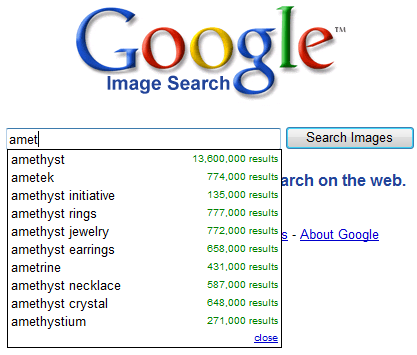
Google started to show suggestions when you type a query in Google Image Search one week after the worldwide rollout of Google Suggest for web search. The suggestions from Google Image Search include many specific words like "paintings", "pictures", "wallpaper", "cartoon", "photos", "landscape", "logo", so they're obtained by analyzing the most popular queries from the image search engine. It's worth noting that Google Image Search shows suggestions on the results pages as well, not just on the homepage.


Google Suggest is now enabled by default in 3 Google search engines: web search, image search, Google Video and it can be disabled from the preferences page or by appending &complete=0 to the URL.

Since August 2008, when the suggestions were first enabled at Google.com, some people complained that the feature is annoying, distracting and it disables browser's autocomplete. Others find it useful: "I rather enjoy this feature, it sometimes helps me form a more coherent search term that yields more results, and it also reduces the number of keystrokes since it finishes words for me even if I've never searched them before". It's also an idea generator, a way to explore trends, attitudes, reactions, and a tool that helps you type complicated queries.


Now that most browsers and toolbars, all major search engines and many other important sites (Amazon, eBay, YouTube) offer query suggestions, people will expect to see them in any search box.

Wednesday, April 1, 2009

Compare Google Search Suggestions

Google Suggest, the feature that autocompletes a search as you type it, is now available in 155 local Google domains and 51 languages. The suggestions are different depending on the language and location, so I think it's an interesting idea to compare them.

This Google Spreadsheet lets you enter the first characters of a Google search in the first cell and it shows the top suggestions in the US, UK, Australia, France, Germany and Congo. The first row uses standard country codes, while the second row uses 2-letter language codes.

When you open the spreadsheet Google will ask you to create a copy in your account.

Friday, March 20, 2009

Google Tests Enhanced Suggestions for IE8

Internet Explorer 8 has been released today and there are many reasons to download it if you use a previous version of IE. Microsoft has finally released a standard-compliant browser, tabs run in separate processes, the annoying modal dialog for finding words in web pages has been replaced with a less intrusive bar, the search box includes suggestions, the browser is faster and more polished.

Speaking of search suggestions, Google tests two features that could save a few clicks: displaying the top result for navigation queries, which usually have a single best answer, and showing ads related to the query at the bottom of the list of suggestions. I don't see the two features, but Sterling, a reader of this blog, spotted them while testing IE8.


Google also tests enabling search suggestions in Image Search:


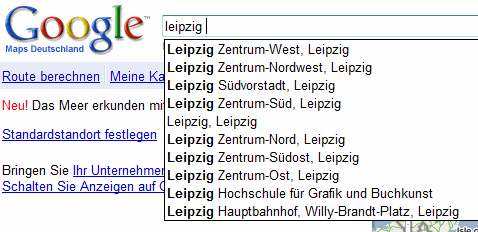
In other news, Google Maps Germany added a questionable feature that shows suggestions when you start to enter a location, after being tested in Google Maps China. If you are logged in, the first suggestions are from your list of saved locations.


{ Thanks, Sterling and Luke. }

Friday, March 6, 2009

Google and Question Answering

Google's auto-complete feature is useful if you're not sure how to formulate your query, but it's very important how you start your search. A post from reddit compared the suggestions for queries that start with "when was" vs. "in which year was" or "why" vs. "for what reasons".


The suggestions for the formal question were fewer, more detailed and more fact-oriented. Compare "for what reason must seats in congress be reapportioned every 10 years" with "why men cheat".

In fact, most of the formal questions are copied from school assignments. As one of the reddit users noticed, "the stupid column suggests actual phrases most people will type into a Google search. The intelligent column suggests high school or college homework, mid term, finals and research questions typed verbatim as seen on the assignment."

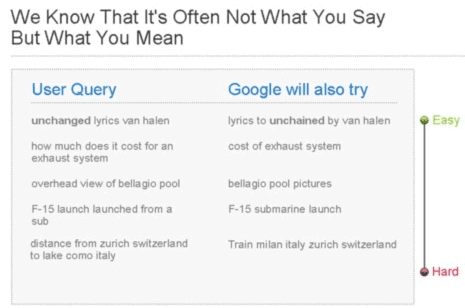
Google has improved the way it handles questions, but it's still a better idea to reformulate your queries and replace "for what reasons" with "motivation" or "cause", "when does twilight come out on DVD" with "twilight DVD release date", "in what way did ernest rutherford contribute to our understanding of the atom and its parts" with "ernest rutherford contribution atom".

Google already rephrases some of the searches, like the examples listed below:


Whether you copy a question from a school assignment or you are really curious to find some information, type short keyword-rich queries in Google's search box.

{ via reddit }

Tuesday, February 17, 2009

How to Disable Google Suggest


Google Suggest, the feature that autocompletes your searches with popular suggestions, has been enabled on google.com last year. The feature is enabled by default and, like all the other Google Search preferences, its state is saved in a cookie. That means the settings can be changed only for the browser you're currently using and they're active as long as the Google cookie is not deleted.

The feature can be disabled in the "preferences" page, from the "query suggestions" section.


If your browser automatically deletes cookies when you close it, you'll probably find an option to add exceptions. For example, Firefox's settings page has a button titled "Exceptions" in the Privacy/Cookies section. Type "google.com" and press "Allow" to prevent Firefox from deleting Google's cookie.


Cookies aren't always reliable and sometimes a small change corrupts them. If you use an ad-blocking plug-in like AdBlock Plus for Firefox, add a new filter with the following format:

http://clients*.google.com/complete/search?*

A filter that will disable Google Suggest in Google Video and YouTube has the following format:

http://suggestqueries.google.com/complete/search?*

Here's a more general filter that should work for all international domains:

http://*.google.*/complete/search?*

Changing the preferences for each browser you use is not very convenient. Some people like to use a portable version of their browser on a USB key (Opera, Firefox or even Chrome), others use software that synchronizes their settings (Moziila Weave is an example).

Another solution is to bookmark or add as a homepage a modified version of Google's homepage that doesn't use Google Suggest. Here's the link:

http://www.google.com/webhp?complete=0 - no more Google Suggest

The "complete" parameter controls the status of Google Suggest. If you like the suggest feature and you want to see it in Google's search results pages, not just on the homepage, bookmark this URL:

http://www.google.com/webhp?complete=1 - Google Suggest on all Google pages

Saturday, February 7, 2009

Google Tests a New Interface for Google Suggest

Cameron Beyer spotted an experiment that simplifies the interface for Google Suggest and adds Google's search buttons below the list of suggestions.


This is not the only experiment for Google Suggest: other changes include the direct access to the top result for navigational queries, direct answers and suggestions from your search history.

Since many people replaced the address box from their browsers with Google's search box, it's natural for Google to make the search box more powerful and to provide even faster access to search results. If Google's search box first became ubiquitous through Google Toolbar, then Google Toolbar's search box evolved into Chrome's Omnibox, the added functionality should now be included in Google's homepage.

Monday, August 25, 2008

Google Suggest, Enabled by Default

As anticipated, Google Suggest will be finally available at google.com. "Today we're excited because Google Suggest will be graduating from Labs and available by default on the Google.com homepage. Over the next week, we'll be rolling this out so that more and more of you will start seeing a list of query suggestions when you start typing into the search box," says Jennifer Liu from Google.

Launched in 2004 as part of the Labs, Google Suggest is an innovative feature that auto-completes a query using a dynamic list of popular queries. "As you type into the search box, Google Suggest guesses what you're typing and offers suggestions in real time. This is similar to Google's Did you mean? feature that offers alternative spellings for your query after you search, except that it works in real time. For example, if you type bass, Google Suggest might offer a list of refinements that include bass fishing or bass guitar. Similarly, if you type in only part of a word, like prog, Google Suggest might offer you refinements like programming, programming languages, progesterone, or progressive. You can choose one by scrolling up or down the list with the arrow keys or mouse."


The feature has been added to many Google services: Google Toolbar, YouTube, Google homepages for high-end mobile phones and for languages that use a non-Latin alphabet. Firefox users already have Google Suggest in the search box.


Other search engines tested similar features. After Ask.com introduced search suggestions last year, Yahoo refined the idea and launched the best interface for suggestions: Search Assist. Unlike Google Suggest, Yahoo's interface is more subtle and it's not limited to prefix-based suggestions.


Google Blog suggests three reasons why auto-complete can be useful: it helps you formulate queries, the feature shows alternative spellings for your query and it saves keystrokes. Despite the advantages, some users will find it annoying because it disables the auto-complete feature from their browsers and it might interfere with their typing. To permanently disable Google Suggest, click on "Do not provide query suggestions in the search box" at the bottom of Google's preferences page or use these advanced tips.