Showing posts with label Google News. Show all posts

Thursday, July 1, 2010

More Customizable Google News

After many months of testing, Google News redesigned the homepage and made it more customizable. One of the most important changes is that each group of related news has a topic ("Mobile industry", "Toyota", "Tropical storm Alex") and you can easily subscribe to the topic.


Google News has a new section called "News for you" whose goal is to show news about your interests. You can add custom news topics, select how often you read news about each topic and choose if you want to see the news grouped in sections or as an uninterrupted stream.


If you like some news site or dislike news sources that provide biased or irrelevant news, you can now personalize Google News and list your preferences. Click on "Settings" at the top of the page, select "News settings" and start typing the sites you'd like to see more often or less often in Google News.

"Sources you promote or demote will be ranked differently for you (but not for anyone else) in your Google News search results and in the stories that you browse on the News homepage and other sections. Please keep in mind that demoted sources may not entirely disappear for you in Google News, and promoted sources may not appear in all of the stories you see," mentions Google.


Each news cluster has a small menu that lets you share stories on social sites (Twitter, Facebook, Google Buzz, Google Reader) or by email.


Google News also added keyboard shortcuts that are available in other Google applications like Gmail and Google Reader: j or n (next story), k or p (previous story), / (search), s (star), . or f (share), Enter (open the headline article for the current story). Unfortunately, keyboard shortcuts are an afterthought, so you'll find many flaws: after selecting the "Email" option, you need to use your mouse to click on the "To" field; after opening the main article of a story and going back to Google News, the story is no longer selected.

"The redesigned Google News homepage is rolling out today in the English-language edition in the U.S., and we plan to expand it to all editions in the coming months. We're making the ability to choose which sources you'll see more or less often available in all English-language editions worldwide and plan to expand it soon," explains Google.

Google has a special page that provides more information about the new features and another page that shows you where are the old features and which features are new.

Google News is now more customizable and has a lot of features that should appeal to Google Reader users. You can't subscribe to news sites, but you can subscribe to topics and list your favorite news sites. Google News lets you star and share each story, navigate using keyboard shortcuts and read news recommended for you. Google News has suddenly morphed from a news aggregator into a news reader, from a website to a web application.


{ Thanks, Sterling. }

Friday, April 9, 2010

Google Dictionary Shows Usage Examples

Google Dictionary has a lot of useful information about English words and expressions. Besides showing synonyms, antonyms, definitions from the dictionary and from the web, related phrases, Google Dictionary added usage examples from Google News.

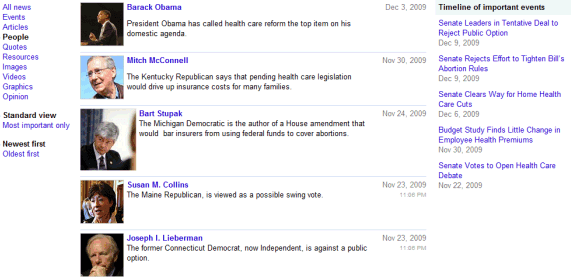
Google extracts the quotes from news articles and attributes the quotes to their authors. You can find quotes in Google News if you search for the name of a popular person and click on the "Quotes" section (e.g.: Gordon Brown, Steve Jobs). Unfortunately, you can't restrict Google News results to quotes.

Saturday, March 13, 2010

Browse Newspapers in Google News Archive

You can now browse all the issues digitized by Google for newspapers like The Montreal Gazette, The Sydney Morning Herald, St. Petersburg Times, Pittsburgh Post-Gazette and more. The digitized newspapers are searchable in the Google News Archive and they're also included in Google's regular search results.


"The News Archive Partner Program provides a way for Google and publishers and repositories to partner together and make historical newspaper archives discoverable online. As part of Google News, the News archive search function provides an easy way to search and explore historical archives. For articles already in digital format, we've worked with the hosts of these archives to crawl and index their materials. When materials aren't easily available in digital format, we have partnered with the copyright holder to scan and present the newspaper in a way that is full-text searchable, fast and easy to navigate," explains Google.

Google also digitizes books, magazines, photos and videos.

{ via Search Engine Roundtable }

Monday, February 1, 2010

Star Google News Stories

Google News added a new feature that lets you star news stories. If you click on a star next to a Google News cluster, you'll add it to the Starred section and Google will notify you when it finds related articles.

"When you star a story in Google News, it's one way to let us know that you're interested in that subject. When there are significant updates, we will alert you by putting the headline in bold so you can get more information," mentions Google News blog.

For some reason, Google doesn't add the starred news stories to Google Bookmarks and there's no option to star a news cluster after you open it. Another issue is that the Starred section only includes the most recent 20 starred stories.

I don't know if this is best way to use this feature, but you could star news stories to read them later. If you don't already use Instapaper or Read It Later, starring Google News clusters is a great way to save them for later.

Sunday, January 10, 2010

Fast Flip in Google News

Google News homepage added a new section for Fast Flip, the innovative service from Google Labs that lets you quickly scan news articles. Scroll to the bottom of the page and you'll see a list of the most viewed articles and some articles about popular topics.


"So far we've found that the speed and visual nature of the service encourages readers to look at many articles and, for the ones that catch their interest, click through to the story publishers' websites," explains the Google News blog.

Unlike Google News, which only shows a small snippet from the article, Fast Flip displays a screenshot that includes the first paragraphs of the article. That means Google needs to get permission from each news site before adding it to Fast Flip. If the experiment is successful and Fast Flip makes news articles more discoverable, it could replace Google News image view.

Wednesday, December 9, 2009

Living Stories, a New Way to Read News

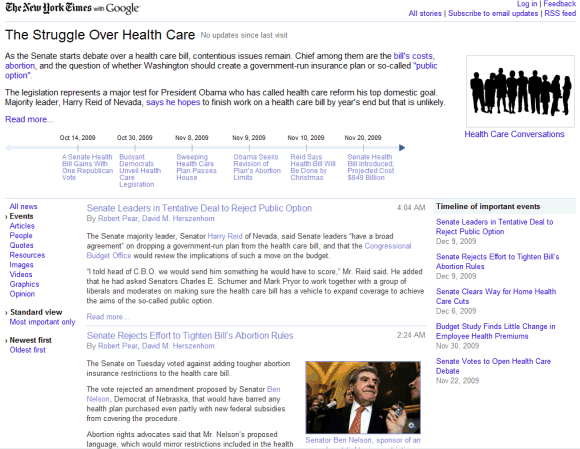
Google Labs launched an interesting service in partnership with New York Times and Washington Post: Living Stories. The goal is to change the way you interact with news online and to read news stories as they unfold.

"Each living story resides at a permanent URL, making it easier to follow the latest updates to the stories that interest you, as well as review deeper background materials that are relevant for a story's context. Living Stories automatically track your interaction with the story, making sure that you are always presented with the news you need, the way you want it. You can read full articles and browse multimedia without ever leaving the Living Story page. Just expand the content you want to see, and minimize it when you're done. Whether you want a short update, deep analysis, feature stories, video, or important quotes, everything related to the story is on the Living Story page."


Google Living Stories aggregates a lot of useful information, but some people might find it overwhelming.

Wednesday, November 4, 2009

Custom Sections Directory for Google News

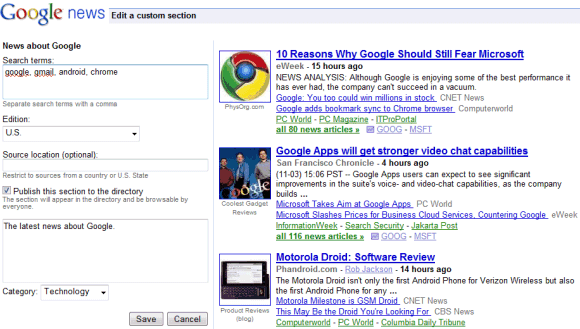
Google News added a directory for custom sections and an easy way to create your own custom sections. Until now, the only way to add a section to Google News was to perform a search and click on "create custom section" at the bottom of the search results page.

Now you can click on "Add a section", find your favorite sections or create new ones.


Google doesn't offer too many options when you create a section: type a list of keywords, restrict the results to a national edition or to the sources from a certain location.

For example, you can create a section for Google-related news by entering [google, gmail, chrome, android] or any other combination of keywords related to Google. You could also create a section about web browsers by entering [browser, chrome, safari, opera browser, firefox, internet explorer].


"Personalized News enables you to get news tailored specifically to your interests. You can personalize your own Google News homepage by creating Custom Sections from your favorite searches and mixing and matching existing standard sections from the regional and language editions of Google News. After defining your Custom Section, you have the option to "Publish this section to the directory" by checking the box provided. This will add your Custom Section to the Custom Section Directory, where other users can add it to their Personalized News page, as well as rate your section," explains Google.

{ via Blogoscoped Forum }

Tuesday, September 15, 2009

Google Fast Flip

Google Labs has been very active lately. The most recent service launched in Google Labs is Fast Flip, a visual version of Google News that encourages serendipitous discoveries.

"Fast Flip is a new reading experience that combines the best elements of print and online articles. Like a print magazine, Fast Flip lets you browse sequentially through bundles of recent news, headlines and popular topics, as well as feeds from individual top publishers. As the name suggests, flipping through content is very fast, so you can quickly look through a lot of pages until you find something interesting," explains Krishna Bharat, the man behind Google News.

The homepage shows thumbnails of the news articles and clicking on the thumbnail loads a screenshot of the article. You can't read the entire article in Google Fast Flip, so you need to visit the original source. The service shows articles from a small number of sources, including BBC News, New York Times, Newsweek and Slate.


The nice thing is that you can quickly go to the next preview by clicking on the blue right arrow or by using the right-arrow key. The service provides recommendation based on the articles you read, you email or explicitly like. There's also a mobile version optimized for iPhone and Android phones.

Monday, August 31, 2009

Google News Suggest

After showing suggestions for web search, image search and video search, Google started to autocomplete your queries in Google News. The suggestions are related to current news, so you don't have to type too many letters to find the latest stories about Opera 10, Walt Disney or Hurricane Jimena.


The interface makes it difficult to select suggestions using a keyboard, since you have to press "Enter" twice to perform a search, but this bug will probably be fixed. Another problem is that you can't disable suggestions by visiting the preferences page and selecting "Do not provide query suggestions in the search box".

Monday, August 24, 2009

Interesting Reads in Google News

"Interesting Reads" is a new Google News section that includes opinionated, thought-provoking articles from news sites. Some titles: "The Daughter Deficit", "America's Food Crisis and How to Fix It", "7 Reasons to Avoid Windows 7".

It's not exactly Arts & Letters Daily, but it's an interesting departure from Google's goal of aggregating and clustering news stories.


Update: The feature has been launched and the section has been renamed to "spotlight". "The Spotlight section of Google News is updated periodically with news and in-depth pieces of lasting value. These stories, which are automatically selected by our computer algorithms, include investigative journalism, opinion pieces, special-interest articles, and other stories of enduring appeal. To access the stories in this section, just click Spotlight on the left side of the page," explains Google.

Friday, June 19, 2009

Authors Are More Visible in Google News

Google started to display author names in Google News, so you can easily find the articles written by your favorite journalists. If you click on the author's name, you'll find his most recent articles and you can subscribe to a feed or get alerts by email.


Another recent feature is the addition of links to Wikipedia articles that offer some helpful context. "Currently, we’re showing a small number of users links to Wikipedia topic pages that serve as a reference on current events," explained a Google spokesperson.

Thursday, May 14, 2009

Google News Redesign

One year after testing a new interface for Google News, the Mountain View-based Internet giant Google launched the redesign. It's more cheerful and visually-rich than the previous design, section pages include more videos and photos, while most of the clutter has been removed.

Google News homepage


Sci-Tech section of Google News

The project that allowed people involved in a news story to post comments has been abandoned, but you can still read the last comments. It didn't scale, it was difficult to automate and the number of comments was too small to matter.

The last Google News comments

Thursday, May 7, 2009

The Atomic Unit of Online Consumption

There's an intense debate in the US about the future of journalism. Some news organizations say that Google News and other news aggregators need to share revenue with publishers. While Google provides an easy way to opt-out from indexing, news sites need Google's traffic to gain new visitors. "We don't want to pull out of the digital ecosystem. We just simply want a fair compensation for the content that we publish," says Jim Moroney, publisher and chief executive of "The Dallas Morning News".

Newspapers can't figure out how to adapt to the online environment and Google is an easy target. News aggregators and search engines are the new destination for news, since users can choose from a lot of different perspectives. Marissa Mayer, Vice President at Google, found an interesting correlation between news articles, songs and short-form videos in her testimony before the US Senate Subcommittee on Communications, Technology, and the Internet:
The atomic unit of consumption for existing media is almost always disrupted by emerging media. For example, digital music caused consumers to think about their purchases as individual songs rather than as full albums. Digital and on-demand video has caused people to view variable-length clips when it is convenient for them, rather than fixed-length programs on a fixed broadcast schedule. Similarly, the structure of the Web has caused the atomic unit of consumption for news to migrate from the full newspaper to the individual article. As with music and video, many people still consume physical newspapers in their original full-length format. But with online news, a reader is much more likely to arrive at a single article. While these individual articles could be accessed from a newspaper's homepage, readers often click directly to a particular article via a search engine or another Website.

Changing the basic unit of content consumption is a challenge, but also an opportunity. Treating the article as the atomic unit of consumption online has several powerful consequences. When producing an article for online news, the publisher must assume that a reader may be viewing this article on its own, independent of the rest of the publication. To make an article effective in a standalone setting requires providing sufficient context for first-time readers, while clearly calling out the latest information for those following a story over time. It also requires a different approach to monetization: each individual article should be self-sustaining. These types of changes will require innovation and experimentation in how news is delivered online, and how advertising can support it.

Speaking of innovation and experimentation, Google News has updated the way news clusters are presented and the new design integrates articles, blogs, local sources, images and quotes.


It's not clear whether newspapers will adapted to the changes, but Arianna Huffington, editor-in-chief of The Huffington Post, has a good conclusion: "The future of quality journalism is not dependent on the future of newspapers".

{ via Google Public Policy Blog }

Tuesday, April 7, 2009

Timeline of Articles from a Google News Cluster

Google News enhanced the presentation for the clusters of related articles: after showing options to filter the articles, a search option and feeds, Google News added a graph that shows the number of sources covering the story. There's also a timeline that lets you understand how the story developed.

"Our grouping technology takes into account many factors, such as titles, text, and publication time. We then use various clustering algorithms to identify stories we think are closely related," explains the help center.


Wednesday, September 24, 2008

Compare Political Quotes

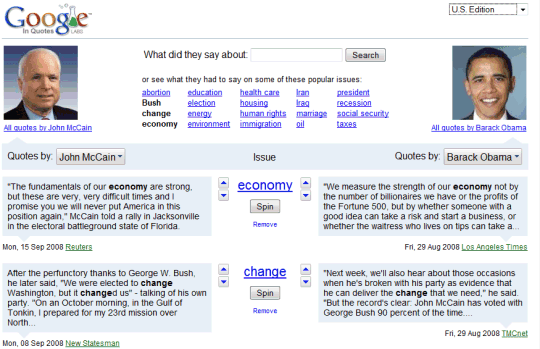
Google Labs added a new experimental service: In Quotes, which compares what different politicians say about popular issues like health care, taxes, environment. The service uses a feature from Google News that detects quotes in news articles and a public API that offers programmatic access to the quotes.

"These quotations are a valuable resource for understanding where people in the news stand on various issues. Much of the published reporting about people is based on the interpretation of a journalist. Direct quotes, on the other hand, are concrete units of information that describe how newsmakers represent themselves. Google News compiles these quotations from online news stories and sorts them into browsable groups based on who is being quoted," informs the FAQ.

Automatically detecting quotes is not an easy task, so not all the quotes are correctly attributed. Google truncates long quotes because they're treated the same as search results snippets.

For now, Google selected a small number of political figures from the US, Canada, India and the UK, but it would be interesting to create a service that allows users to enter two or more names and then save the interesting quotes.

Monday, September 8, 2008

Google Digitizes Historical Newspapers

In its never-ending quest to organize the world's information, Google started to digitize old editions from newspapers like Pittsburgh Post-Gazette, St. Petersburg Times, Today's News-Herald and make them available at Google News Archive.


"Today, we're launching an initiative to make more old newspapers accessible and searchable online by partnering with newspaper publishers to digitize millions of pages of news archives. This effort expands on the contributions of others who've already begun digitizing historical newspapers. In 2006, we started working with publications like the New York Times and the Washington Post to index existing digital archives and make them searchable via Google News Archive," explains Google Blog.

The newspapers digitized by Google are available for free in an interface similar to the one from Google Book Search. Unfortunately it's quite difficult to read articles, even though Google automatically detects headlines and centers the associated content.

Monday, July 28, 2008

Google News Source Filtering

When you view a cluster in Google News, there's a new option to filter sources: you can restrict news articles to blogs and to local news sites that are relevant to your query. The filters are a good way to find opinionated articles and more up-to-date information from local sites.

Here's an example of cluster that groups articles about some new information regarding last week's Qantas Airways flight that was forced to make an emergency landing in Manila. Google shows three filters: blogs, Australia (Qantas is the national airline of Australia) and Manila, Philippines.

There's also a search box that is supposed to let you find articles from the cluster, but it doesn't work properly right now.

Wednesday, July 23, 2008

The Unlikely Integration Between Google News and Digg

TechCrunch reiterates the rumor that Google is about to acquire Digg. "The two companies have reportedly signed a letter of intent and are close to a deal that will bring Digg under the Google News property. The acquisition price is in the $200 million range, says one source." While I don't find too many reasons why Google would buy Digg, it's clear that Digg and Google News don't have almost anything in common.

Google hand-picked more than 4500 sources and used them to cluster news articles. The idea behind Google News was to display different perspectives on the same subject and to rank them algorithmically. Even the homepage is generated automatically, based on the editorial decisions of the publication included in Google News. Last year, when Google News added comments, the feature surprised many people: the comments could only come from "people or organizations who were actual participants in the story in question".

Digg gets the stories from users, who have to manually submit each item. To be promoted on the homepage, a story has to be voted by a sufficient number of users, who can also post comments. "Digg is democratizing digital media. As a user, you participate in determining all site content by discovering, selecting, sharing, and discussing the news, videos, and podcasts that appeal to you," explains the site. Launched as an alternative to Slashdot, Digg expanded from technology news to general news.

To integrate Google News with Digg, Google would have to radically change its news site and this is unlikely. Besides, Google News could easily add a voting system and user comments like in the recent Google search experiment, without needing a site like Digg. If Google does acquire Digg, I think it's for mining a big amount of votes and detecting patterns that could be used to improve features like "edit search results". Digg is also a good platform for experimenting with filtering information, news recommendations and could be helpful in Google's new social quests.

Thursday, July 10, 2008

Google News Tests New Design

Google News experiments with a lively and visually-rich design that shows images, videos, quotes, but also interesting and popular stories. There's a "featured photo" section that uses images from AFP, The Associated Press, Reuters, marking the first time when Google News promotes stories just because it has the permission to show associated images.

If you are logged in, the new interface personalizes all the sections, not just the front page, and you can switch to the non-personalized version to see the differences.

The homepage shows a list of "developing stories".


The Sci-Tech section, with more photos.


Front-page sections can be minimized and look like iGoogle gadgets.


Google News clusters prominently display the main title.


The footer is more lighthearted. "All the news that's fit to crawl. Auto-generated from over 4500 news sources, void where prohibited."

In June, Google News blog announced the new UI, without getting into details. "Over the course of the next few weeks, you may notice a few changes to Google News... or maybe not. You see, we'll be running some experiments on the look and feel of our site, based on an accumulation of user research and feedback, as well as the evolving state of online journalism."

{ Thnaks, Santosh. }

Wednesday, May 21, 2008

Google News Layer for Google Earth

There's a new layer for Google Earth that shows Google News stories related to a location. At the recent "Factory Tour of Search" event, Google explained the difficulties of automatically identifying the locations of a news story. For example, just because a news article includes "Paris" doesn't mean that the article talks about France's capital. It could be about the Texas city or Paris Hilton, so the algorithm needs to disambiguate names, identify complete addresses and determine the importance of an alleged location in a text. Google News also uses its automatically-generated clusters to validate locations and their importance to a news story.

"The launch of Google News on Google Earth is a milestone in the evolution of the geobrowser. By spatially locating the Google News' constantly updating index of stories from more than 4,500 news sources, Google Earth now shows an ever-changing world of human activity as chronicled by reporters worldwide. Zoom into areas of personal interest and peruse headlines of national, regional and, when fully zoomed in, even the most local of interest," says Brandon Badger, Product Manager of Google's Geo team.

To enable the Google Earth layer, go to the Layers sidebar, expand "Gallery" and select "Google News" from the impressive list of overlays. Another news-related layer that has been recently added to Google Earth is for New York Times, but it's likely that the news are geo-coded manually.


If you want to read news related to a location in your browser, add a local section to the personalized Google News homepage. "Adding a Local News section allows you to track news stories from and about a particular city or region. While this function is currently only available in our English language editions, we hope to add more languages and regions in the near future," explains the Google News help center.