Tuesday, March 4, 2008

Add Feeds to Google Reader in Internet Explorer 7

Unlike Firefox, Internet Explorer 7 doesn't let you subscribe to a feed using your favorite feed reader. You can only use the feed reader included in IE7, which is not that good. That's probably the reason why 70% of Google Reader's traffic comes from Firefox users.

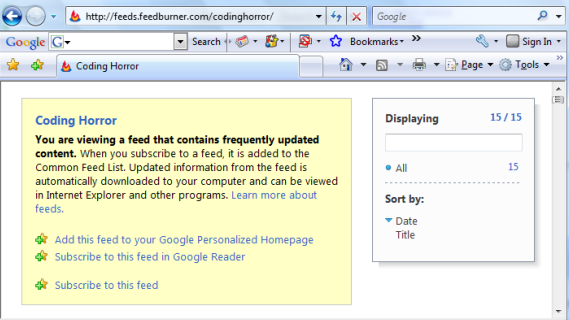
Google Toolbar 5 took the liberty to add options for subscribing to feeds in iGoogle and Google Reader. So the next time you want to add a feed in Google Reader, you can just click on the orange button from Internet Explorer and select one of the two options added by Google Toolbar.


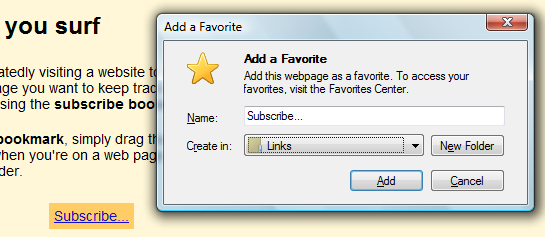
Alternatively, you could go to Google Reader's Settings page, scroll to the bottom of the Goodies tab, right-click on "Subscribe...", select "Add to Favorites" and choose the "Links" folder. Make sure that the links bar is visible.

Monday, March 3, 2008

A Feed for Unread Gmail Messages

Gmail has a very cool feature not available in other webmail applications: feeds for unread messages. For example, the feed http://mail.google.com/mail/feed/atom/ shows the most recent unread items from your inbox. Gmail also offers feeds for your labels: http://mail.google.com/mail/feed/atom/labelname/, but it would be nice to have a comprehensive listing of all the unread messages, not just the ones that have a certain label. As you probably know, "unread" is one of the many built-in labels in Gmail, so you can use it to obtain this feed: http://mail.google.com/mail/feed/atom/unread/. In the URLs above, you can replace "http" with "https" for more security.

Gmail's feeds require authentication, so they don't work in many feed readers, like Google Reader or iGoogle. There are some feed readers that support password-protected feeds:

Browsers
* assuming you're logged in to your Gmail account, you can add any of the feeds to Firefox's Live Bookmarks (this is more like a workaround than true support for authenticated feeds)
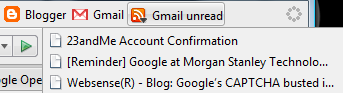

* you can subscribe to the feeds in Opera if you don't like the built-in mail client

Desktop feed readers
* some desktop feed readers listed by Google that support Atom 0.3, SSL/HTTPS, and HTTP authentication

Online feed readers
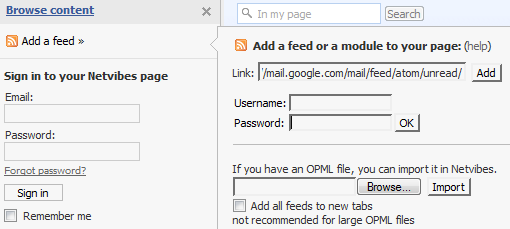
* Netvibes is a notable example of online feed reader that supports authenticated feeds

Gmail recommends to make sure that the feed's content is private. "Keep in mind when you subscribe to your Gmail feed that some aggregators allow you to share, syndicate, or otherwise re-publish the feeds you subscribe to. This means that even though your Gmail feed is private, its contents could be made public through one of these methods. So you'll want to double-check the privacy settings in your aggregator to make sure you aren't sharing any information you don't want to."
Sunday, March 2, 2008

YouTube Tests Higher Resolution Videos

Following the announcement from November, YouTube started to test higher quality videos. If you append &fmt=6 to the URL of a YouTube video, you should get better quality videos. Note that this only works for a small number of videos.

Here's an example of video that's available both in the regular version (320x240) and in a higher quality encoding (448x336). The audio is now encoded at a sample rate of 44100 Hz, up from 22050 Hz. As you can see in the screenshots below, the right image is clearer and more detailed.


While this increase of resolution might seem minor, for the example above YouTube's re-encoded FLV file is more than twice bigger than the old one (from 9 MB to 22 MB), so it will load much slower.

If you append &fmt=18, YouTube downloads the video as a MP4 (H264 with AAC audio), encoded at 480x360. Here's the same video encoded as MP4.


To make things easier, there's a Greasemonkey script that automatically adds the magic parameter for you.

Related:
A discussion about the technical details

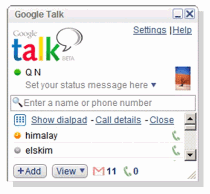
Google Talk, Not Dead After All

14 months ago, when Google added Vista support for its instant messaging client, nobody anticipated a long period with no updates. According to a Google engineer, the desktop client hasn't been abandoned and we should expect a completely new version of Google Talk. While I couldn't find when it will be released or the new features, it's reassuring to hear that Google is still working on GTalk.

Some of the most popular features requested by users are already available in the online interfaces: group chats, invisible mode, AIM integration, so we should expect to find them in a new release of Google Talk. Other features are already standard in other IM clients: video conferencing, conference calls, phone calls.

Last year, a presentation for Google Apps inadvertently included a screenshot of Google Talk enhanced with the ability to make phone calls. In the comments, someone informed us that "internally at Google, this feature is already active since long".


What would you like to see in this all-new version of Google Talk?

Google's Engineering Philosophy


A slide from a presentation at last year's Google Engineering Open House listed 12 principles that guide programming at Google:

1. All developers work out of a ~single source depot; shared infrastructure!
2. A developer can fix bugs anywhere in the source tree.
3. Building a product takes 3 commands ("get, config, make")
4. Uniform coding style guidelines across company
5. Code reviews mandatory for all checkins
6. Pervasive unit testing, written by developers
7. Unit tests run continuously, email sent on failure
8. Powerful tools, shared company-wide
9. Rapid project cycles; developers change projects often; 20% time
10. Peer-driven review process; flat management structure
11. Transparency into projects, code, process, ideas, etc.
12. Dozens of offices around world => hire best people regardless of location

{ Image from Google Press Center. }

More Details About Google Health

This week we found more details about Google Health, a not-yet-released service for managing personal health information. Marissa Mayer showed us some screenshots and the underlying principles of Google Health:
One of the most exciting and innovative parts of Google Health is our platform strategy. We're assembling a directory of third-party services that interoperate with Google Health. Right now, this means you'll be able to automatically import information such as your doctors' records, your prescription history, and your test results into Google Health in order to easily access and and control your data. Later, this platform strategy will mean that you will be able to interact with services and tools easily, and will be able to do things like schedule appointments, refill prescriptions, and start using new wellness tools.


Google sponsored the research of George Church, a scientist that "plans to unlock the secrets of common diseases by decoding the DNA of 100,000 people in the world's biggest gene sequencing project". Asked if Google Health could make it easy to access genetics services, Marissa Mayer said: "We have some genetic partners where we've already been making investments. Genetics is much further out, and will be done at the control and discretion of the user."

Eric Schmidt explained that the idea for launching a health service came after looking at Google Search data. "[We] looked at what do people actually do with search in terms of the volume, and the importance of health came out No. 1... We tend to think of Google Health as an extension of search."

The service is likely not to include advertising since it will encourage people to use Google Search more. Google's CEO gave Google News as an example of non-monetized service: "Every month we say to ourselves should we add ads to Google News or add more news features to Google News and every month we decide to add more Google news features. (...) A Google News user is more likely to be a Google searcher and therefore clicks on ads more."

Eric Schmidt also gave an interesting keynote speech at the Healthcare Information and Management Systems Society conference (a YouTube user comments: "As ever Eric Schmidt is knowledgeable, funny and engaging").

Saturday, March 1, 2008

Personalized YouTube Homepage

YouTube tests a new homepage that is customizable and centered on your activities. Instead of displaying the same content for all YouTube users, the new homepage looks different, depending on your preferences and your activities. Here's what's new:

* recommended videos, a feature that relies on your previous activity: favorite videos, subscribed channels
* latest from your subscriptions: 12 videos from 3 of your subscribed channels
* friend activity: a list of videos uploaded, favorited or rated by your YouTube contacts. This information is displayed only if your contacts added it to their public profiles.
* inbox: messages, friend invites, received videos.
* statistics about your videos (total views, subscribers) and your activity (subscriptions, comments).


"The goal with all of this is to gauge people's interest in having a YouTube that's tailored to the individual. Ultimately, we want to get you one step closer to the videos you'll enjoy most every time you come to the site," explains YouTube.

To try the new homepage, log in to your YouTube account and then go to http://www.youtube.com/iyt.