Google updated Android's voice search application and added support for actions. In addition to searching the Web, you can now use the application to send text messages and email messages, find songs and start playing them, call your contacts and local businesses, launch Google Maps Navigation and get directions to a location, visit a site using Google's "I'm Feeling Lucky" feature and more. It's like iPhone's voice control, except that there are more actions available and you need an Internet connection to use it.
"Voice Actions are a series of spoken commands that let you control your phone using your voice. To use Voice Actions, tap the microphone button on the Google search box on your home screen, or press down for a few seconds on the physical search button on your phone to activate the Speak Now screen," explains Google.
Here are some examples of actions you can try after installing the app:
* go to Google News
* map of London
* call [name of one of your contacts]
For some reason, you can't use the built-in app to play music, so you need to install Pandora, Last.fm, Rdio or mSpot before using actions like "listen to Morcheeba". It would be nice to use voice actions to launch applications or to use custom actions defined by other applications.
The new version of the voice search application requires Android 2.2 (Froyo) and voice actions are limited to English (US). Search for [voice search] in the Android Market or use this QR code. If you're not in the US, you want to try the application and you have root access to your phone, you might need to install Market Enabler and fake your location.
Google also released:
* a new version of the Gesture Search app for Android, which adds a motion gesture for starting the application
* a new version of the Google Search widget, with support for query refinements
* Chrome to Phone, which lets you send links and short texts from Google Chrome to a phone that runs Android Froyo. If you've previously installed the Chrome extension and the associated Android app, you should first uninstall them. There's also a Firefox extension that offers similar features.
{ via Google Blog }
Showing posts with label Android. Show all posts
Showing posts with label Android. Show all posts
Thursday, August 12, 2010


Sunday, August 1, 2010
Send Links from Firefox to an Android Phone
Android 2.2 has a cool service for sending messages to phones: Android Cloud to Device Messaging. "The service provides a simple, lightweight mechanism that servers can use to tell mobile applications to contact the server directly, to fetch updated application or user data."
A simple way to use this service is to send a link from your browser to an Android device. Chrome to Phone is a Chrome extension that makes this possible, assuming that you also install an Android application on your phone. The extension has been recently updated and you can use it to send links, phone numbers and text from web pages.
There's also an unofficial Firefox extension called "Send to phone", which offers similar features. The Firefox extensions adds an option to the contextual menu, so you don't have to click on the toolbar button to send some text.


Some things you can try:
* send a Google Maps link and the Google Maps app from your phone should handle it
* send a link to a YouTube video and the video should start playing on your phone
* copy a phone number from a web page and send it to your phone
* copy a short text from a web page (<1KB) and send it to your phone's clipboard.
Note that you need a device that uses Android 2.2 (Froyo), which is officially available for Nexus One, HTC Evo and HTC Desire. Motorola Droid will be updated to Froyo starting from next week, while other phones will be updated in the coming months.
A simple way to use this service is to send a link from your browser to an Android device. Chrome to Phone is a Chrome extension that makes this possible, assuming that you also install an Android application on your phone. The extension has been recently updated and you can use it to send links, phone numbers and text from web pages.
There's also an unofficial Firefox extension called "Send to phone", which offers similar features. The Firefox extensions adds an option to the contextual menu, so you don't have to click on the toolbar button to send some text.
Some things you can try:
* send a Google Maps link and the Google Maps app from your phone should handle it
* send a link to a YouTube video and the video should start playing on your phone
* copy a phone number from a web page and send it to your phone
* copy a short text from a web page (<1KB) and send it to your phone's clipboard.
Note that you need a device that uses Android 2.2 (Froyo), which is officially available for Nexus One, HTC Evo and HTC Desire. Motorola Droid will be updated to Froyo starting from next week, while other phones will be updated in the coming months.
Monday, July 12, 2010
App Inventor for Android
App Inventor is a Google software that allows anyone to develop simple Android apps. "To use App Inventor, you do not need to be a developer. App Inventor requires NO programming knowledge. This is because instead of writing code, you visually design the way the app looks and use blocks to specify the app's behavior."
App Inventor lets you create applications that use advanced features like GPS or sending SMS messages. "You can build an app to help you remember where you parked your car, an app that shows the location of your friends or colleagues at a concert or conference, or your own custom tour app of your school, workplace, or a museum."
Google says that the software has been successfully tested in several schools across the US. "App Inventor for Android gives everyone, regardless of programming experience, the opportunity to control and reshape their communication experience. We've observed people take pride in becoming creators of mobile technology and not just consumers of it," says Google's Mark Friedman.
You need an invitation to try App Inventor, but you can complete this form to get an invitation.

"The App Inventor project is led by MIT computer scientist Harold Abelson, the founding director of the Free Software Foundation, Public Knowledge, and the Creative Commons who's now on sabbatical at Google," reports the Register.
"The Google project, Mr. Abelson said, is intended to give users, especially young people, a simple tool to let them tinker with smartphone software, much as people have done with computers. Over the years, he noted, simplified programming tools like Basic, Logo and Scratch have opened the door to innovations of all kinds. Microsoft's first product, for example, was a version of Basic, pared down to run on personal computers. The Google application tool for Android enables people to drag and drop blocks of code — shown as graphic images and representing different smartphone capabilities — and put them together, similar to snapping together Lego blocks. The result is an application on that person's smartphone," notes the New York Times.
App Inventor is especially suitable for Android because Android apps are collections of reusable intents. Even if you build a simple application, you can easily make it more powerful by using components from other applications.
{ Thanks, Kevin. }
App Inventor lets you create applications that use advanced features like GPS or sending SMS messages. "You can build an app to help you remember where you parked your car, an app that shows the location of your friends or colleagues at a concert or conference, or your own custom tour app of your school, workplace, or a museum."
Google says that the software has been successfully tested in several schools across the US. "App Inventor for Android gives everyone, regardless of programming experience, the opportunity to control and reshape their communication experience. We've observed people take pride in becoming creators of mobile technology and not just consumers of it," says Google's Mark Friedman.
You need an invitation to try App Inventor, but you can complete this form to get an invitation.
"The App Inventor project is led by MIT computer scientist Harold Abelson, the founding director of the Free Software Foundation, Public Knowledge, and the Creative Commons who's now on sabbatical at Google," reports the Register.
"The Google project, Mr. Abelson said, is intended to give users, especially young people, a simple tool to let them tinker with smartphone software, much as people have done with computers. Over the years, he noted, simplified programming tools like Basic, Logo and Scratch have opened the door to innovations of all kinds. Microsoft's first product, for example, was a version of Basic, pared down to run on personal computers. The Google application tool for Android enables people to drag and drop blocks of code — shown as graphic images and representing different smartphone capabilities — and put them together, similar to snapping together Lego blocks. The result is an application on that person's smartphone," notes the New York Times.
App Inventor is especially suitable for Android because Android apps are collections of reusable intents. Even if you build a simple application, you can easily make it more powerful by using components from other applications.
{ Thanks, Kevin. }
Wednesday, June 9, 2010
Google Maps Navigation for Canada and 10 European Countries
Google Maps Navigation for Android is now available for Canada, Austria, Belgium, Denmark, France, Germany, Italy, the Netherlands, Portugal, Spain, and Switzerland, in addition to the 3 countries that were already supported: US, UK and Ireland. It's interesting to notice that Google still uses data from Tele Atlas for all the countries supported by Google Maps Navigation, except for the US and Canada.
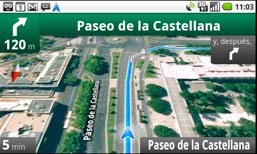
"Google Maps Navigation is an Internet-connected GPS navigation or 'satnav' system that provides turn-by-turn voice guidance as a free feature of Google Maps. Google Maps Navigation (beta) with Search by voice is available in version 4.2 of Google Maps, on Android devices 1.6 and higher," explains Google.
Free turn-by-turn navigation could be an important reason why people choose a mobile phone, so Google and Nokia try to make the most of Google Maps Navigation for Android and Ovi Maps for Symbian. Most likely, in the near future, all smartphones will include a free application for navigation.
In other related news, Google Search by Voice is now available for German, Italian, Spanish and French. Search by voice is an important feature of the Quick Search Box app for Android, Google Mobile App for iPhone and Blackberry. The nice thing is that you don't have to download an update for none of the applications, as the new languages are automatically recognized.
"Google Maps Navigation is an Internet-connected GPS navigation or 'satnav' system that provides turn-by-turn voice guidance as a free feature of Google Maps. Google Maps Navigation (beta) with Search by voice is available in version 4.2 of Google Maps, on Android devices 1.6 and higher," explains Google.
Free turn-by-turn navigation could be an important reason why people choose a mobile phone, so Google and Nokia try to make the most of Google Maps Navigation for Android and Ovi Maps for Symbian. Most likely, in the near future, all smartphones will include a free application for navigation.
In other related news, Google Search by Voice is now available for German, Italian, Spanish and French. Search by voice is an important feature of the Quick Search Box app for Android, Google Mobile App for iPhone and Blackberry. The nice thing is that you don't have to download an update for none of the applications, as the new languages are automatically recognized.
Monday, May 24, 2010
Send Links from Google Chrome to an Android Phone
One of the most interesting APIs in Android 2.2 allows developers to create applications that can receive messages from servers. "Android Cloud to Device Messaging (C2DM) is a service that helps developers send data from servers to their applications on Android devices. The service provides a simple, lightweight mechanism that servers can use to tell mobile applications to contact the server directly, to fetch updated application or user data."
To try the new APIs, you can install an Android app and a Chrome extension that let you send a link from the browser to your phone and automatically open the URL in Android's browser. Install the Android application, register your device and enable "launch browser/maps directly". Then install the Chrome extension, click on the icon and log in to the same Google account used in Android. Now you can send links to your phone by clicking on a button in Google Chrome.

The application requires Android Froyo, which is only available for Nexus One at the moment.
To try the new APIs, you can install an Android app and a Chrome extension that let you send a link from the browser to your phone and automatically open the URL in Android's browser. Install the Android application, register your device and enable "launch browser/maps directly". Then install the Chrome extension, click on the icon and log in to the same Google account used in Android. Now you can send links to your phone by clicking on a button in Google Chrome.
The application requires Android Froyo, which is only available for Nexus One at the moment.
Adobe Reader for Android
After releasing Flash Player for Android, Adobe launches a PDF reader for Android. The applications is available in the Android Market and it can be installed only if your phone runs Android 2.1 or later and it has at least 256 MB of RAM and a 550 MHz processor.
Nexus One already comes with a document viewer based on Quickoffice, but the application doesn't do a great job at previewing PDF files. Adobe Reader for Android opens PDF files much faster than Quickoffice and it has a better zooming feature.
"Adobe Reader for Android offers multi-touch gestures, like pinch-and-zoom, as well as double-tap-zoom, flick-scrolling and panning. We've also added a reflow mode, which will take text-heavy documents with wide margins, and automatically wrap the content for easy viewing on smaller screens," explains Adobe.
The application doesn't include basic features like search or support for password-protected files, but it's snappy, documents are readable and the applications opens in full screen. There aren't many free PDF viewers for Android and Adobe's application is clearly the best right now.

Nexus One already comes with a document viewer based on Quickoffice, but the application doesn't do a great job at previewing PDF files. Adobe Reader for Android opens PDF files much faster than Quickoffice and it has a better zooming feature.
"Adobe Reader for Android offers multi-touch gestures, like pinch-and-zoom, as well as double-tap-zoom, flick-scrolling and panning. We've also added a reflow mode, which will take text-heavy documents with wide margins, and automatically wrap the content for easy viewing on smaller screens," explains Adobe.
The application doesn't include basic features like search or support for password-protected files, but it's snappy, documents are readable and the applications opens in full screen. There aren't many free PDF viewers for Android and Adobe's application is clearly the best right now.
Sunday, May 23, 2010
Flash in Android Froyo
Google has started updating Nexus One phones to Android Froyo and a pre-release version of the update file is already public. I updated my phone using a pre-rooted version from Modaco which doesn't require the stock recovery image.
Even if it's not included in Android, the Flash runtime is one of the few applications that require Android 2.2. Right now, you can install from the Android Market the first beta release for Flash 10.1.
Whether you love it or hate it, installing Flash changes the way you look at a mobile phone. HTML5 may be the future, but a lot of websites use Flash for playing video, music, games and interactive content. Instead of getting messages that recommend you to install the Flash plug-in, you'll see the actual content.
The trouble with Flash on a mobile phone is that most Flash content is designed for a computer and it's difficult to use on a device with a small screen. Video players have small buttons and it's challenging to click on one of them, some websites serve high-quality videos that aren't appropriate for a slow Internet connection, clicking on a Flash object is a disrupting experience because you might open a new page, pause a video or display the Flash content in full-screen.
I've tried to open many sites that use Flash and the experience isn't smooth. Animations are sometimes choppy, web pages load much slower, scrolling web pages that use Flash is slow and there's a lot of lag when zooming a page with Flash content. In some cases, the browser is no longer responsive for a few seconds and you need to wait until you can switch to another page. Fortunately, Adobe managed to optimize the code and using Flash doesn't drain your phone's battery much faster.
The version you can install from the Android Market is not the final release, but don't expect too many changes until next month. It's nice to have options, so I recommend to install the Flash runtime and to change the browser settings so that plug-ins are loaded "on-demand". This way, web pages will continue to load fast and you'll only display Flash content when necessary.
Even if it's not included in Android, the Flash runtime is one of the few applications that require Android 2.2. Right now, you can install from the Android Market the first beta release for Flash 10.1.
Whether you love it or hate it, installing Flash changes the way you look at a mobile phone. HTML5 may be the future, but a lot of websites use Flash for playing video, music, games and interactive content. Instead of getting messages that recommend you to install the Flash plug-in, you'll see the actual content.
The trouble with Flash on a mobile phone is that most Flash content is designed for a computer and it's difficult to use on a device with a small screen. Video players have small buttons and it's challenging to click on one of them, some websites serve high-quality videos that aren't appropriate for a slow Internet connection, clicking on a Flash object is a disrupting experience because you might open a new page, pause a video or display the Flash content in full-screen.
I've tried to open many sites that use Flash and the experience isn't smooth. Animations are sometimes choppy, web pages load much slower, scrolling web pages that use Flash is slow and there's a lot of lag when zooming a page with Flash content. In some cases, the browser is no longer responsive for a few seconds and you need to wait until you can switch to another page. Fortunately, Adobe managed to optimize the code and using Flash doesn't drain your phone's battery much faster.
The version you can install from the Android Market is not the final release, but don't expect too many changes until next month. It's nice to have options, so I recommend to install the Flash runtime and to change the browser settings so that plug-ins are loaded "on-demand". This way, web pages will continue to load fast and you'll only display Flash content when necessary.
Thursday, May 20, 2010
Google TV Announced
Google TV is a new platform that aims to bring the Web to TVs. Google developed a custom Android version that runs Google Chrome and improves the TV viewing experience by allowing you to find TV programs, showing recommendations and integrating content from the Web.
"With Google Chrome built in, you can access all of your favorite websites and easily move between television and the web. This opens up your TV from a few hundred channels to millions of channels of entertainment across TV and the web. Your television is also no longer confined to showing just video. With the entire Internet in your living room, your TV becomes more than a TV — it can be a photo slideshow viewer, a gaming console, a music player and much more," explains Google.
Google's demo from the Google I/O conference wasn't very convincing. Google acknowledged that many other companies tried to create similar products without too much success. The explanation is probably that they were ahead of their time, but Google says that they were unsuccessful because they dumbed down the Web experience, they were closed and users had to choose between watching TV and browsing the Web.
"The project started 2½ years ago, with a vision of a walled garden of TV-optimized web services. But the landscape keeps shifting, particularly in the capabilities of mobile devices. The only solution big enough for the problem is to bring the whole web to your TV," says Vincent Dureau, who is in charge of Google TV.
Google partnered with Sony, Intel and Logitech to add Google TV to "televisions, Blu-ray players and companion boxes". The first Internet-enabled TV that runs Google's software will be launched this fall by Sony and it promises to provide "richer internet access so you can browse the web just like you would from a computer."
But why not connect your TV to a computer? Android is a great operating system for a mobile phone, but it doesn't look very well on a big HDTV. Not all the Android applications are useful on a TV and those that are useful won't take advantage on the huge screen estate of the TV. Google promises to introduce a Google TV SDK and some APIs for web applications, but that will happen next year.
Google TV has a lot of potential and I'm sure it could eventually become a great product. The software could make TV programs more interactive by detecting phone numbers, addresses or URLs, it could allow you to chat with a friend while watching the same TV show, it could create chat rooms for everyone who watches the same show, it could use visual search to show information about an object from the screen or it could translate a foreign-language movie.
If you already have an Android phone, you can use it as a remote control. Since the TV and the phone can run the same applications, you'll be able to sign in using the same Google Account and synchronize your data. Favorite an YouTube video on a phone, watch it later on your TV and use it to generate a list of recommended TV shows.
Can we switch to the other box?
"With Google Chrome built in, you can access all of your favorite websites and easily move between television and the web. This opens up your TV from a few hundred channels to millions of channels of entertainment across TV and the web. Your television is also no longer confined to showing just video. With the entire Internet in your living room, your TV becomes more than a TV — it can be a photo slideshow viewer, a gaming console, a music player and much more," explains Google.
Google's demo from the Google I/O conference wasn't very convincing. Google acknowledged that many other companies tried to create similar products without too much success. The explanation is probably that they were ahead of their time, but Google says that they were unsuccessful because they dumbed down the Web experience, they were closed and users had to choose between watching TV and browsing the Web.
"The project started 2½ years ago, with a vision of a walled garden of TV-optimized web services. But the landscape keeps shifting, particularly in the capabilities of mobile devices. The only solution big enough for the problem is to bring the whole web to your TV," says Vincent Dureau, who is in charge of Google TV.
Google partnered with Sony, Intel and Logitech to add Google TV to "televisions, Blu-ray players and companion boxes". The first Internet-enabled TV that runs Google's software will be launched this fall by Sony and it promises to provide "richer internet access so you can browse the web just like you would from a computer."
But why not connect your TV to a computer? Android is a great operating system for a mobile phone, but it doesn't look very well on a big HDTV. Not all the Android applications are useful on a TV and those that are useful won't take advantage on the huge screen estate of the TV. Google promises to introduce a Google TV SDK and some APIs for web applications, but that will happen next year.
Google TV has a lot of potential and I'm sure it could eventually become a great product. The software could make TV programs more interactive by detecting phone numbers, addresses or URLs, it could allow you to chat with a friend while watching the same TV show, it could create chat rooms for everyone who watches the same show, it could use visual search to show information about an object from the screen or it could translate a foreign-language movie.
If you already have an Android phone, you can use it as a remote control. Since the TV and the phone can run the same applications, you'll be able to sign in using the same Google Account and synchronize your data. Favorite an YouTube video on a phone, watch it later on your TV and use it to generate a list of recommended TV shows.
Can we switch to the other box?
Android 2.2: Froyo Is a Major Update
Google announced today Android 2.2, a major update for Google's mobile operating system. There are many changes and a lot of new features that are really useful.
Android now uses a just-in-time compiler that improves the performance for some applications, especially for games. "The new Dalvik JIT compiler in Android 2.2 delivers between a 2-5X performance improvement in CPU-bound code vs. Android 2.1 according to various benchmarks," says Xavier Ducrohet.
Android's browser includes the V8 JavaScript engine created for Google Chrome, so web pages that use JavaScript heavily will load much faster (some benchmarks show a 2-3X improvement). Google claims that Android's browser is the fastest mobile browser available today.
Developers have a new API for app data backup, which is really useful if you want to switch to a new Android device or you want to install a custom version of Android. There's also an extremely useful messaging API for sending data to an Android phone from another device. For example, you'll be able to send a link from your computer to your Android phone and the phone will automatically open the browser and navigate to the web address. You can also send files and install applications from your computer over the air.
Android Market will have a web interface, applications can auto-update and you can quickly install all the updates, instead of manually installing each update. Another change is that applications can be moved to the SD card. Google also announced that it has acquired SimplifyMedia, a company that developed some cool applications for streaming your music.
Android 2.2 has built-in support for tethering and it can transform a phone into a portable hotspot. Android Market includes some great applications for tethering, but it's nice to see that's now a built-in feature.
You can add multiple languages to the keyboard and switch between them by swiping across the space bar, there's a new UI for the camera, there's support for Exchange calendars and remote wipe, LED flash for the Camcorder, support for sharing contacts with other phones and much more.
Flash 10.1 is now available as a beta application in the Android Market, but it requires Android 2.2. Nexus One and Motorola Droid will be updated to Froyo next month. The other HTC phones launched this year will be updated in the second half of the year. "This includes popular models like the Desire and Droid Incredible as well as hotly anticipated phones like the Evo 4G, MyTouch slide and upcoming models."
Android now uses a just-in-time compiler that improves the performance for some applications, especially for games. "The new Dalvik JIT compiler in Android 2.2 delivers between a 2-5X performance improvement in CPU-bound code vs. Android 2.1 according to various benchmarks," says Xavier Ducrohet.
Android's browser includes the V8 JavaScript engine created for Google Chrome, so web pages that use JavaScript heavily will load much faster (some benchmarks show a 2-3X improvement). Google claims that Android's browser is the fastest mobile browser available today.
Developers have a new API for app data backup, which is really useful if you want to switch to a new Android device or you want to install a custom version of Android. There's also an extremely useful messaging API for sending data to an Android phone from another device. For example, you'll be able to send a link from your computer to your Android phone and the phone will automatically open the browser and navigate to the web address. You can also send files and install applications from your computer over the air.
Android Market will have a web interface, applications can auto-update and you can quickly install all the updates, instead of manually installing each update. Another change is that applications can be moved to the SD card. Google also announced that it has acquired SimplifyMedia, a company that developed some cool applications for streaming your music.
Android 2.2 has built-in support for tethering and it can transform a phone into a portable hotspot. Android Market includes some great applications for tethering, but it's nice to see that's now a built-in feature.
You can add multiple languages to the keyboard and switch between them by swiping across the space bar, there's a new UI for the camera, there's support for Exchange calendars and remote wipe, LED flash for the Camcorder, support for sharing contacts with other phones and much more.
Flash 10.1 is now available as a beta application in the Android Market, but it requires Android 2.2. Nexus One and Motorola Droid will be updated to Froyo next month. The other HTC phones launched this year will be updated in the second half of the year. "This includes popular models like the Desire and Droid Incredible as well as hotly anticipated phones like the Evo 4G, MyTouch slide and upcoming models."
Saturday, May 15, 2010
Android Stats
Less than a week before Google I/O, the conference where Google is expected to unveil Android 2.2 (FroYo), it's clear that Google's mobile operating system is no longer an experiment. Android is now a popular software that runs on millions of devices and it's part of a growing ecosystem.
Google's CEO, Eric Schmidt, said that "65,000 mobile phones powered by Google's Android operating system are being shipped every day" and that "Android is now being used on 34 mobile devices in 49 countries".
According to a NPD research, Android is the second most popular smartphone operating system in the US in terms of units sold in the first quarter of 2010 (28%), after Blackberry OS (36%). Apple's iPhone OS dropped to the third position (21%).
Cédric Beust, a former Google engineer who worked on the Android team, says that Android's growth is surprising:
"I don't know what's the most surprising: how ambitious that goal was four years ago or how far Android has come today. It's hard to believe that Android shipped its first device about a year and a half ago and at that time, Apple had already sold more than ten million iPhones. Who would have guessed that it would only take Android eighteen months to catch up and pass the iPhone in market share? In this short period of time, we've gone through four major releases (and many, many minor ones, some of which you probably never even heard of), and each new version has been a major milestone that got everyone on the team incredibly excited. FroYo is no exception, prepare to be blown away by what you will see very soon."
It's interesting to see that carrier distribution and promotion continues to be very important. The most popular Android phone, Motorola Droid, has been aggressively promoted by Verizon. Nexus One has been sold online by Google, but the results are underwhelming and Google plans to close the online store.
Google's CEO, Eric Schmidt, said that "65,000 mobile phones powered by Google's Android operating system are being shipped every day" and that "Android is now being used on 34 mobile devices in 49 countries".
According to a NPD research, Android is the second most popular smartphone operating system in the US in terms of units sold in the first quarter of 2010 (28%), after Blackberry OS (36%). Apple's iPhone OS dropped to the third position (21%).
Cédric Beust, a former Google engineer who worked on the Android team, says that Android's growth is surprising:
"I don't know what's the most surprising: how ambitious that goal was four years ago or how far Android has come today. It's hard to believe that Android shipped its first device about a year and a half ago and at that time, Apple had already sold more than ten million iPhones. Who would have guessed that it would only take Android eighteen months to catch up and pass the iPhone in market share? In this short period of time, we've gone through four major releases (and many, many minor ones, some of which you probably never even heard of), and each new version has been a major milestone that got everyone on the team incredibly excited. FroYo is no exception, prepare to be blown away by what you will see very soon."
It's interesting to see that carrier distribution and promotion continues to be very important. The most popular Android phone, Motorola Droid, has been aggressively promoted by Verizon. Nexus One has been sold online by Google, but the results are underwhelming and Google plans to close the online store.
Thursday, May 6, 2010
Translate Text Using Google Goggles
Google Goggles 1.1 for Android added another feature that makes visual search more useful: translating text. For now, the application detects text in the following languages: English, French, Italian, German, Spanish and is able to translate the text to all the languages supported by Google Translate.
"Traveling to another country can be an amazing experience. The opportunity to immerse yourself in a different culture can give you a new perspective. However, it can be hard to fully enjoy the experience if you do not understand the local language. For example, ordering food from a menu you can not read can be an adventure," explains Google's mobile blog.
Google says that it's a good idea to point your phone at the phrase you want to translate and select the region that includes the text to improve detection.
I tested the feature by trying to translate phrases from a French magazine (Science & Vie Junior), but the results weren't great all the time. Here's one of the best results:


To install Google Goggles, you need a phone that runs Android 1.6+. Search for Goggles in the Android Market or open the barcode scanner and scan this QR code.
"Traveling to another country can be an amazing experience. The opportunity to immerse yourself in a different culture can give you a new perspective. However, it can be hard to fully enjoy the experience if you do not understand the local language. For example, ordering food from a menu you can not read can be an adventure," explains Google's mobile blog.
Google says that it's a good idea to point your phone at the phrase you want to translate and select the region that includes the text to improve detection.
I tested the feature by trying to translate phrases from a French magazine (Science & Vie Junior), but the results weren't great all the time. Here's one of the best results:
(screenshots taken using ShootMe on a Nexus One)
To install Google Goggles, you need a phone that runs Android 1.6+. Search for Goggles in the Android Market or open the barcode scanner and scan this QR code.
Monday, May 3, 2010
What Are Your Favorite Android Apps?
Even if tech blogs keep track of the number of apps in the Android Market, it's important to know that Android users can install applications from other sources. If Google decides that an application like Music Junk should be removed from the Market, you can install it from SlideME or from any other website.
There are many reasons why the number of Android apps is still small: Android Market is not available for all Android phones, paid apps are only available in a few countries, there's no official web interface and Google has rarely promoted Android Market. That's why I decided to share some of my favorite Android apps. I've only tested them using Google Nexus One, but they should work on other Android phones.
1. Quick Settings replaces a lot of widgets: it's the quickest way to turn off WiFi, to change brightness settings, to turn off auto rotation or turn on bluetooth.
2. NetCounter is a simple application that monitors network traffic for 3G and WiFi. It's useful if you don't have a mobile data plan or your traffic is limited.
3. AppBrain is a useful service that lets you find other great Android applications. It shows recommendations, applications that are suddenly popular and it also have a web interface.
4. Cubed is a music player with an innovative user interface. It's better looking than the stock music player and it's fun to use.

5. Spare Parts is an application from Android's SDK which shows a lot of interesting stats about your phone's battery and a summary of application usage. If you're wondering how much time your Android phone spent with screen on or you want to monitor the network traffic of an application, use Spare Parts.
6. Astro is one of the best Android file managers and it comes with a lot of nifty perks, including an image viewer and an archive viewer.
7. AK Notepad is a simple application for writing notes. You can add a note to your home screen, add a reminder or export it to a text file.
8. StopWatch provides a stop watch timer, a countdown timer and has a very simple user interface.
9. Ethereal Dialpad lets you "create flowing music with an expressive touch synthesizer". It's relaxing and you never get bored using it.
10. Seesmic is my favorite free Twitter client for Android. It has support for multiple accounts, background notifications and it has a great composing dialog.
11. Google Translate combines translation with a text-to-speech service. If you use voice input, you don't even have to type the text you want to translate.
12. Nexus One Torch - probably the best flashlight application for a rooted Nexus One.
What are your favorite Android applications?
Update: Matt Cutts also shared his favorite Android apps.
There are many reasons why the number of Android apps is still small: Android Market is not available for all Android phones, paid apps are only available in a few countries, there's no official web interface and Google has rarely promoted Android Market. That's why I decided to share some of my favorite Android apps. I've only tested them using Google Nexus One, but they should work on other Android phones.
1. Quick Settings replaces a lot of widgets: it's the quickest way to turn off WiFi, to change brightness settings, to turn off auto rotation or turn on bluetooth.
2. NetCounter is a simple application that monitors network traffic for 3G and WiFi. It's useful if you don't have a mobile data plan or your traffic is limited.
3. AppBrain is a useful service that lets you find other great Android applications. It shows recommendations, applications that are suddenly popular and it also have a web interface.
4. Cubed is a music player with an innovative user interface. It's better looking than the stock music player and it's fun to use.
5. Spare Parts is an application from Android's SDK which shows a lot of interesting stats about your phone's battery and a summary of application usage. If you're wondering how much time your Android phone spent with screen on or you want to monitor the network traffic of an application, use Spare Parts.
6. Astro is one of the best Android file managers and it comes with a lot of nifty perks, including an image viewer and an archive viewer.
7. AK Notepad is a simple application for writing notes. You can add a note to your home screen, add a reminder or export it to a text file.
8. StopWatch provides a stop watch timer, a countdown timer and has a very simple user interface.
9. Ethereal Dialpad lets you "create flowing music with an expressive touch synthesizer". It's relaxing and you never get bored using it.
10. Seesmic is my favorite free Twitter client for Android. It has support for multiple accounts, background notifications and it has a great composing dialog.
11. Google Translate combines translation with a text-to-speech service. If you use voice input, you don't even have to type the text you want to translate.
12. Nexus One Torch - probably the best flashlight application for a rooted Nexus One.
What are your favorite Android applications?
Update: Matt Cutts also shared his favorite Android apps.
Friday, April 30, 2010
On Flash for Mobile Phones
Apple's CEO wrote a thoughtful post about Adobe Flash and explained the reasons why Apple doesn't intend to add support for Flash to the iPhone OS:
"Flash was created during the PC era – for PCs and mice. Flash is a successful business for Adobe, and we can understand why they want to push it beyond PCs. But the mobile era is about low power devices, touch interfaces and open web standards – all areas where Flash falls short."
Steve Jobs says that Flash doesn't perform well on mobile devices, it drains the battery and it's not optimized for touch interfaces. Flash is also a way to create cross-platform applications, but Apple doesn't want applications that look the same way on all mobile platforms and don't take advantage of iPhone's features. "We cannot be at the mercy of a third party" is the main reason why Steve Jobs doesn't want to include Flash's runtime. Flash's main use today is to play videos, but web developers should start using the native video tag, which is already supported by most web browsers, including iPhone's browser.
Apple's refusal to support Flash in popular products like iPhone or iPad has an important side-effect: web developers will be forced to take advantage of HTML5 features like native video, canvas or create animations using SVG, instead of/in addition to using Adobe's proprietary plug-in.
Unfortunately, users can't access a lot of content on their mobile devices. There are many sites built using Flash and many popular sites use Flash to create animations, charts and other interactive content. Adobe is already working on Flash Player 10.1, the first version of the plug-in that will work on smartphones, if you don't take into account Flash Lite. Flash will soon be available for Android, Windows Mobile, Symbian, Palm and Google will include the plug-in in Chrome and Chrome OS. Flash Player 10.1 for Android will be available as a public preview in May at Google I/O and the general release will be in June.
Google's decision is pragmatic: even if HTML5 is the future, Flash is an important part of the web today. "[Sometimes being open] means not being militant about the things consumer are actually enjoying," said Google's Andy Rubin. Users will be able to choose if they want to enable Flash and Adobe will be pressured to deliver a better product.
Some might say that Android is actually the anti-iPhoneOS: it's an open source operating system, it encourages competition and collaboration in the mobile space, it lets you replace built-in functionality, install applications from other sources than the Android Market and customize your device. Android is not "at the mercy of a third party", but third parties can add a lot of value. Even if Android's user experience is inferior to iPhone's user experience, Android is an open platform that can be fully customized and a better catalyst for innovation. Android doesn't strive for perfection, it's a flexible platform that lets you transform a device into whatever you want it to be.
"Flash was created during the PC era – for PCs and mice. Flash is a successful business for Adobe, and we can understand why they want to push it beyond PCs. But the mobile era is about low power devices, touch interfaces and open web standards – all areas where Flash falls short."
Steve Jobs says that Flash doesn't perform well on mobile devices, it drains the battery and it's not optimized for touch interfaces. Flash is also a way to create cross-platform applications, but Apple doesn't want applications that look the same way on all mobile platforms and don't take advantage of iPhone's features. "We cannot be at the mercy of a third party" is the main reason why Steve Jobs doesn't want to include Flash's runtime. Flash's main use today is to play videos, but web developers should start using the native video tag, which is already supported by most web browsers, including iPhone's browser.
Apple's refusal to support Flash in popular products like iPhone or iPad has an important side-effect: web developers will be forced to take advantage of HTML5 features like native video, canvas or create animations using SVG, instead of/in addition to using Adobe's proprietary plug-in.
Unfortunately, users can't access a lot of content on their mobile devices. There are many sites built using Flash and many popular sites use Flash to create animations, charts and other interactive content. Adobe is already working on Flash Player 10.1, the first version of the plug-in that will work on smartphones, if you don't take into account Flash Lite. Flash will soon be available for Android, Windows Mobile, Symbian, Palm and Google will include the plug-in in Chrome and Chrome OS. Flash Player 10.1 for Android will be available as a public preview in May at Google I/O and the general release will be in June.
Google's decision is pragmatic: even if HTML5 is the future, Flash is an important part of the web today. "[Sometimes being open] means not being militant about the things consumer are actually enjoying," said Google's Andy Rubin. Users will be able to choose if they want to enable Flash and Adobe will be pressured to deliver a better product.
Some might say that Android is actually the anti-iPhoneOS: it's an open source operating system, it encourages competition and collaboration in the mobile space, it lets you replace built-in functionality, install applications from other sources than the Android Market and customize your device. Android is not "at the mercy of a third party", but third parties can add a lot of value. Even if Android's user experience is inferior to iPhone's user experience, Android is an open platform that can be fully customized and a better catalyst for innovation. Android doesn't strive for perfection, it's a flexible platform that lets you transform a device into whatever you want it to be.
Sunday, April 25, 2010
New York Times App for Android?
Andrew B. visited Nexus One's YouTube channel and noticed a demo for an official New York Times application:
The New York Times application for iPhone is one of the best free apps from Apple's App Store, so it's not surprising to see that Google wanted a similar application for Android.
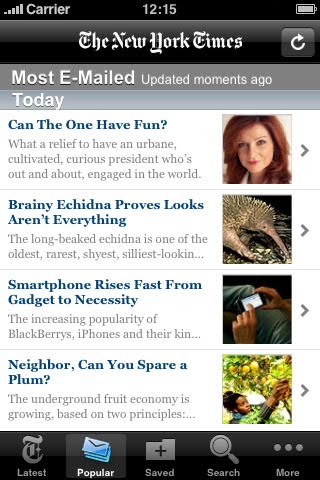
A FAQ page from the NYTimes site has more information:
"The NYTimes application for Android has a unique video display experience, font size adjustment and the ability to share articles via e-mail, SMS, and social apps such as Twitter and Facebook. The NYTimes application for Android works on Android smartphones with operating system version 1.6x or higher. It's available for free at the Android Market (app store). On your Android smartphone, visit nytimes.com/androidapp to download the application."
{ Thanks, Andrew. }
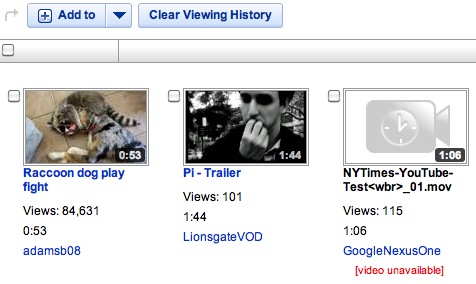
I was on YouTube yesterday and noticed Google's Nexus One channel released a new video. The title looked like it had not been edited because it used underscores instead of spaces and it ended with the file extension.
The video showcased a New York Times app for Android running on the Nexus One with the user flipping through news articles and using the widget. The video has been pulled and I can't find it on either Google's main or Nexus One channel.
The New York Times application for iPhone is one of the best free apps from Apple's App Store, so it's not surprising to see that Google wanted a similar application for Android.
A FAQ page from the NYTimes site has more information:
"The NYTimes application for Android has a unique video display experience, font size adjustment and the ability to share articles via e-mail, SMS, and social apps such as Twitter and Facebook. The NYTimes application for Android works on Android smartphones with operating system version 1.6x or higher. It's available for free at the Android Market (app store). On your Android smartphone, visit nytimes.com/androidapp to download the application."
{ Thanks, Andrew. }
Thursday, April 22, 2010
Android on an iPhone
A member of the iPhone Dev Team, a group of hacker that develop software for jailbreaking iPhone, managed to install Android on a first-generation iPhone. David Wong replaced Apple's bootloader with the open-source OpeniBoot so that he could install a different operating system. He also used a version of the Linux kernel ported to the iPhone in 2008.
"It should be pretty simple to port forward to the iPhone 3G. The 3GS will take more work. Hopefully with all this groundwork laid out, we can make Android a real alternative or supplement for iPhone users. Maybe we can finally get Flash," says David.
This is one of the many benefits of an open-source software: people can modify it and use it in new, interesting ways. You can install Android on a Windows Mobile phone, on an iPhone, on a notebook and on many other devices.
"It should be pretty simple to port forward to the iPhone 3G. The 3GS will take more work. Hopefully with all this groundwork laid out, we can make Android a real alternative or supplement for iPhone users. Maybe we can finally get Flash," says David.
This is one of the many benefits of an open-source software: people can modify it and use it in new, interesting ways. You can install Android on a Windows Mobile phone, on an iPhone, on a notebook and on many other devices.
Wednesday, April 21, 2010
Google Maps Navigation for the UK and Ireland
Google Maps Navigation, the Android application that offers turn-by-turn directions for free, is now available for the UK and Ireland. "Like other satnav devices, Navigation includes 3D views, turn-by-turn voice guidance, and automatic rerouting. But because Google Maps Navigation is connected to the Internet, it also features powerful functionality you can't get from other satnav services, including the most up to date map, business, and traffic data, access to satellite and street views, and of course, search," explains Google.
Google's application could add all the countries available in Google Maps, but the licensing terms don't allow Google to show satellite imagery or driving directions in a real-time navigation application. Last year, Google started to use its own mapping data in the US and it's likely that it will do the same for other countries.
Until Google adds more countries to the application, a developer managed to create Google Maps Brut, a modified version of Google Maps Navigation that supports most countries. Even if Google Maps Brut breaks Google's terms, you can try it by installing Nav Launhcer from the Android Market.
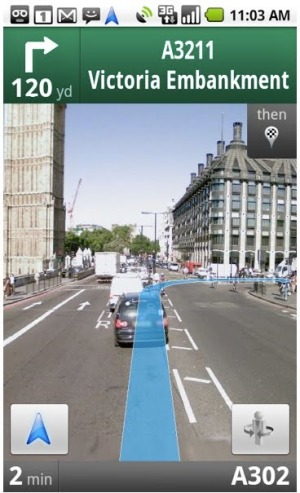
Google Maps Navigation requires Android OS 1.6+ and comes included as a part of Google Maps for Android v3.2 and higher. To update the software, Google suggests to search for [Google Maps] in the Android Market.
Google's application could add all the countries available in Google Maps, but the licensing terms don't allow Google to show satellite imagery or driving directions in a real-time navigation application. Last year, Google started to use its own mapping data in the US and it's likely that it will do the same for other countries.
Until Google adds more countries to the application, a developer managed to create Google Maps Brut, a modified version of Google Maps Navigation that supports most countries. Even if Google Maps Brut breaks Google's terms, you can try it by installing Nav Launhcer from the Android Market.
Google Maps Navigation requires Android OS 1.6+ and comes included as a part of Google Maps for Android v3.2 and higher. To update the software, Google suggests to search for [Google Maps] in the Android Market.
The Best Google Mobile Apps, Only for Android
Google Mobile's page for Android has an interesting message: "The best Google Mobile applications are available for phones that run the Android operating system". That may seem obvious, considering that Google developed a lot of applications only for Android: Gmail, Google Talk, Google Finance, Google Goggles, Google Maps Navigation, Google Shopper and more.
Google's applications are one of the most important competitive advantage for Android, but that doesn't mean that some of the applications couldn't run on other platforms. If Google didn't develop Android, many of the applications would be available in Apple's App Store. Google claims that it takes "great care to ensure that [its tools] ultimately serve you, rather than [its] own internal goal or bottom line", but restricting innovative tools to a single platform doesn't benefit users.
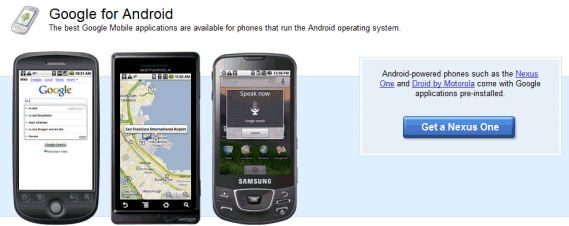
Google's applications are one of the most important competitive advantage for Android, but that doesn't mean that some of the applications couldn't run on other platforms. If Google didn't develop Android, many of the applications would be available in Apple's App Store. Google claims that it takes "great care to ensure that [its tools] ultimately serve you, rather than [its] own internal goal or bottom line", but restricting innovative tools to a single platform doesn't benefit users.
Monday, April 12, 2010
Google Buys Plink to Improve Visual Mobile Search
Google acquired Plink, a small startup that developed Plink Art, an Android application that lets you identify paintings using your mobile phone's camera. Plink Art was one of the winners of the Android Developer Challenge 2. You can find the application in Android's market: just search for [Plink Art].
"The coolest feature of Plink Art is instant art identification. Just snap a photo and if the painting is in our database our visual search system will recognize it and tell you all about it. Currently Plink knows about tens of thousands of famous paintings," explains Plink's website.
I tried the application on my Nexus One by taking photos of Google Image Search results, but the results were terrible. Google Goggles found much better results for the same images.
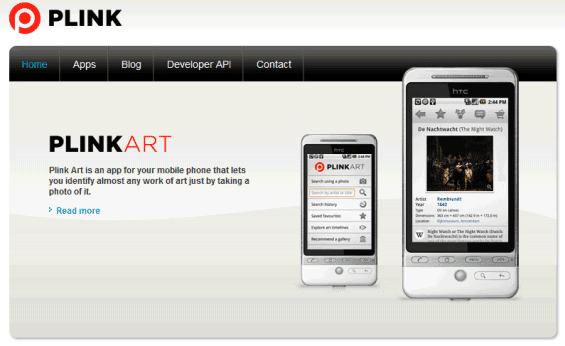
The two Plink co-founders and only employees will work to improve Google Goggles, a visual search tool that already lets you find books, places and artwork. From Plink's blog:
"We started Plink to bring the power of visual search to everyone, and we're delighted to be taking a big step towards that goal today. Google has already shown that it's serious about investing in this space with Google Goggles, and for the Plink team the opportunity to take our algorithms to Google-scale was just too exciting to pass up. The visual search engines of today can do some pretty cool things, but they still have a long long way to go. We're looking forward to helping the Goggles team build a visual search engine that works not just for paintings or book covers, but for everything you see around you. There are beautiful things to be done with computer vision – it's going to be a lot of fun!"
{ via LA Times Blog}
"The coolest feature of Plink Art is instant art identification. Just snap a photo and if the painting is in our database our visual search system will recognize it and tell you all about it. Currently Plink knows about tens of thousands of famous paintings," explains Plink's website.
I tried the application on my Nexus One by taking photos of Google Image Search results, but the results were terrible. Google Goggles found much better results for the same images.
The two Plink co-founders and only employees will work to improve Google Goggles, a visual search tool that already lets you find books, places and artwork. From Plink's blog:
"We started Plink to bring the power of visual search to everyone, and we're delighted to be taking a big step towards that goal today. Google has already shown that it's serious about investing in this space with Google Goggles, and for the Plink team the opportunity to take our algorithms to Google-scale was just too exciting to pass up. The visual search engines of today can do some pretty cool things, but they still have a long long way to go. We're looking forward to helping the Goggles team build a visual search engine that works not just for paintings or book covers, but for everything you see around you. There are beautiful things to be done with computer vision – it's going to be a lot of fun!"
{ via LA Times Blog}
Thursday, March 18, 2010
Google TV

New York Times reports that Google has partnered with Intel and Sony to create a TV platform powered by Android.
"Google and Intel have teamed with Sony to develop a platform called Google TV to bring the Web into the living room through a new generation of televisions and set-top boxes. (...) The partners envision technology that will make it as easy for TV users to navigate Web applications, like the Twitter social network and the Picasa photo site, as it is to change the channel. Google intends to open the Google TV platform, which is based on its Android operating system for cellphones, to software developers in the hopes of spurring the same creativity that the consumers have seen in phone apps."
The idea is not new, as many other companies tried to bring the Web to the TV. YouTube already has a version for large screens, Google already sells TV advertising and there are many Google apps that could improve the TV experience. New York Times says that Google's software will include a new interface for YouTube, a browser and other Android apps that will extend the functionality.
"Google has built a prototype set-top box, but the technology may be incorporated directly into TVs or other devices, like Blu-ray players. (...) A person with knowledge of the Google TV project said that the set-top box technology was sufficiently advanced that Google had begun testing it with Dish Network, one of Google's longstanding partners in the TV Ads program."
Thursday, March 4, 2010
Gesture Search for Android
There's a new Android app in Google Labs: Gesture Search. Google's applications offers an alternative input method: drawing letters.
"Gesture Search from Google Labs lets you search your Android-powered device by drawing alphabet gestures on the touch screen. It allows you to quickly find a contact, a bookmark, an application, or a music track from hundreds or thousands of items, all in one place. It is fast and fun to use."
In the screenshot below, you can see Gesture Search in action: after drawing letter "a" in the Contacts app, the user draws the letter "n" to quickly find Andy.

Gesture Search shows two important things about Google's mobile operating system. If you use an Android phone, you'll be able to try a lot of great apps developed by Google. Another important thing is that Android apps can integrate with built-in applications, so you're able to find applications, contacts, songs and bookmarks using a third-party app.
Unfortunately, Gesture Search is only available for Android 2.0 and not many people can upgrade to this version without buying a Droid or a Nexus One. At least for now.
"Gesture Search from Google Labs lets you search your Android-powered device by drawing alphabet gestures on the touch screen. It allows you to quickly find a contact, a bookmark, an application, or a music track from hundreds or thousands of items, all in one place. It is fast and fun to use."
In the screenshot below, you can see Gesture Search in action: after drawing letter "a" in the Contacts app, the user draws the letter "n" to quickly find Andy.
Gesture Search shows two important things about Google's mobile operating system. If you use an Android phone, you'll be able to try a lot of great apps developed by Google. Another important thing is that Android apps can integrate with built-in applications, so you're able to find applications, contacts, songs and bookmarks using a third-party app.
Unfortunately, Gesture Search is only available for Android 2.0 and not many people can upgrade to this version without buying a Droid or a Nexus One. At least for now.
Subscribe to:
Posts (Atom)