Showing posts with label Google Chrome. Show all posts

Saturday, August 21, 2010

Google Chrome's PDF Plugin Uses Foxit Software

Google Chrome's built-in PDF plugin uses Foxit PDF SDK. As you can see from this page, there are many references to Foxit's SDK, which is a proprietary set of tools that allow applications to read or modify PDF files.


"With the incredible small size (less than 2MB) and amazingly fast speed, Foxit PDF SDK (DLL) 2.0 is your absolute choice to develop your own PDF applications," suggests Foxit.

Google decided to include two of the most popular plugins (Flash and PDF) in Google Chrome to make the browser more secure. The PDF plugin runs inside Chrome's sandbox so that vulnerabilities can no longer install malware on your computer. The Flash plugin is automatically updated by Google and it's likely that it will run inside Chrome's sandbox in the future. Google Chrome 5 already includes the Flash plugin, while the PDF plugin is available in Google Chrome 6 (dev, beta and soon in the stable channel).


{ Thanks, Tulchin. }

Tuesday, August 17, 2010

Chrome Web Store and Online Games

1up.com reports that Google Chrome Web Store will be launched in October and online games will be one of its main attractions. "Set to launch this October, the store aims to make a proper marketplace for browser games -- one that solves a lot of the issues of games on the web today, from discovery to monetization."

Google's game developer advocate, Mark DeLoura, thinks that it's difficult to find great online games, so Google Chrome Web Store tries to solve this problem by allowing users to rate games and write reviews. Chrome users will be able to install games, which adds shortcuts to the "new tab" page and grants additional permissions to the games. Not all games will be free, but Chrome users can buy games directly from the Web Store and pay using Google Checkout. Google's platform will support free trials and subscriptions, while developers will only pay a 5% processing fee for each transaction.


Will users pay for web apps in Chrome's store? More than half of the Android apps are free and paid Android apps are only available in 13 countries because of Google Checkout's limitations. Android Market doesn't make it easy to find interesting new applications and doesn't recommend other applications based on the ones you've installed. Hopefully, Chrome Web Store will do a much better job than the Android Market.

Monday, August 9, 2010

System-Level Google Chrome Setup

Google Chrome's setup installs the software only for the current user. This way, you don't need administrator rights to install Chrome. Until now, those who wanted to install Google Chrome for all the users of a computer had to use the Chrome build from Google Pack.

Google has recently added a more straightforward location for a system-level setup: http://www.google.com/chrome/eula.html?msi=true. The MSI installer only works in Windows, it currently installs the latest Dev Channel build and it seems to be targeted toward enterprise users.

"The current user-level installation experience doesn't require elevation (installing at system-level does), and most users don't know or care about system-level installs. That said, it would probably be a good idea to have some links on the download pages that say 'click here for a system-level install or MSI', so interested/advanced users could find it easily as part of the normal download install flow," explained Glenn Wilson, a Google Chrome engineer. The link to the MSI installer will probably be added to Chrome's download page in the near future.

Tuesday, August 3, 2010

Yet Another Chromium Updater

One of the drawbacks of using Chromium, the open source browser that powers Google Chrome, is that you have to manually update the software. Google offers three channels for early releases: beta, dev and Canary, but you still have to wait up to a week to try the latest features.

Fortunately, it's not very difficult to write a script that downloads the latest Chromium build every 6 hours or every day and then installs it. For example, the URL of the most recent Windows build that passed all the tests is: http://build.chromium.org/buildbot/continuous/LATEST/mini_installer.exe.

Chromium Updater is a Windows application that makes it easier to update Chromium. You can change the update interval, switch to the snapshot channel, which includes the Chromium builds that didn't pass all the tests, use the built-in Flash and PDF plug-ins from an existing Chrome installation. Some of the text from the setup wizard is in German, but the application is in English.


It's important to note that Chromium builds are likely to be buggier and less stable than Google Chrome builds. Chromium also lacks some features that are available in Google Chrome: the built-in Flash and PDF plug-ins, support for H.264 videos, Google branding, automatic updates.

{ via Google Chrome Help Forum }

Saturday, July 24, 2010

Google Chrome Canary Build

Google Chrome's team added a new releases channel for early adopters and developers: Canary builds. Unlike the beta channel and the dev channel, Canary builds can be installed without overwriting a regular Chrome build. That means you can install both a Canary build and a regular build that could be on the stable, beta or dev channel.

The Canary build is only available for Windows, it's "installed to a different path, gets updated separately, and runs side by side with an existing stable/beta/dev installation". Google says that the Canary build will usually be the same as the dev build. "Sometimes if necessary, we may push additional updates on Canary build so its version is higher than dev."


"The canary usually updates more frequently than the Dev channel (higher risk
of bustage), and we're working on making it update as often as we have
successful nightly builds. When something doesn't work on the canary, I can
just fall back to my Beta Google Chrome," says Mark Larson, from the Chrome team.

Now that Google Chrome synchronizes bookmarks, settings and it will also synchronize extensions, passwords, browser history, it doesn't even matter that the two builds use separate profiles. Unfortunately, you can't make Chrome Canary your default browser. Google's explanation that it's "a secondary installation of Google Chrome" doesn't make any sense.

Lee Mathews from DownloadSquad thinks that having four flavors of Chrome is "Vista-esque". Google probably noticed that there are many people who install random Chromium builds and decided to offer a channel that updates even faster than once a week, while allowing users to install a stable version of Chrome, just in case the "bleeding edge" builds have major bugs or they're unstable.

Google Chrome Canary builds - Windows-only, for now.

{ Thanks, Tim. }

Friday, July 23, 2010

A New Chrome Release Every 6 Weeks

Chromium Blog informs us that Google will release stable Chrome versions more often. "Running under ideal conditions, we will be looking to release a new stable version about once every six weeks, roughly twice as often as we do today. (...) Since we are going to continue to increment our major versions with every new release (i.e. 6.0, 7.0, 8.0, 9.0) those numbers will start to move a little faster than before. Please don't read too much into the pace of version number changes - they just mean we are moving through release cycles and we are geared up to get fresher releases into your hands!"

Anthony Laforge says that it takes too long to release new features and users have to wait for months to use them. Google Chrome 4.1 was an interesting experiment: the first Chrome release that added a very small number of features. Instead of waiting until May, when Chrome 5 was released, users could try inline translation and content filtering in March.

Here's a list of the major Chrome releases:

Chrome 1 - December 11, 2008 (first stable release)
.. 161 days ..
Chrome 2 - May 21, 2009 (full-page zoom, autofill)
.. 117 days ..
Chrome 3 - September 15, 2009 (HTML5 video, themes)
.. 132 days ..
Chrome 4 - January 25, 2010 (extensions, bookmark sync)
.. 57 days ..
Chrome 4.1 - March 23, 2010 (translation, content filtering)
.. 63 days ..
Chrome 5 - May 25, 2010 (better HTML5 support, tabbed bookmark manager, built-in Flash)

It's clear that Google wants to decrease the interval between two releases from about 100 days to about 50 days. That means each release will include less new features and will be less important.

Screen Capture Extension for Google Chrome

Google repackaged some of the code from the Feedback extension as a screen capturing Chrome extension. Google's tool lets you save the content of a tab as a PNG image, annotate the screenshot and highlight interesting parts of the image. The extension is able to capture the visible content of a tab, a region or the whole page, but it needs to scroll the page to capture the content that's not visible.


Google's extension has a better interface than Webpage Screenshot, but it has less annotation options than Awesome Screenshot. Another advantage of Google's extension is that it scrolls the page horizontally if it's necessary.

{ Thanks, Arpit. }

Tuesday, July 20, 2010

Google Chrome Frame's Brief Description

Google Chrome Frame is a plug-in for Internet Explorer that uses Chrome's rendering engine to display web pages. It's especially useful for those who can't install other browsers, but want to run web applications that use HTML5 features and need a powerful JavaScript engine.

Google's description is really beautiful: "Chrome Frame renders the Web of the future in the browsers of the past. It's like strapping a rocket engine to a minivan." Google thinks that Internet Explorer is a "browser of the past" that can't handle "the Web of the future", so it needs a plug-in to make it faster and bring it up to date.

Fortunately, Internet Explorer 9 addresses these issues and it will finally make Internet Explorer a modern browser.


Chrome experiment in Internet Explorer 6, using Chrome Frame. Screenshot licensed as Creative Commons.

Wednesday, July 14, 2010

Install Google Web Apps in Google Chrome

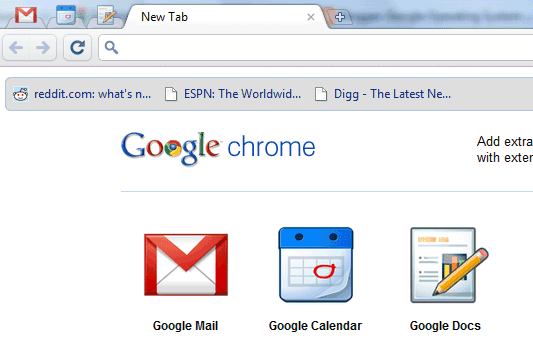
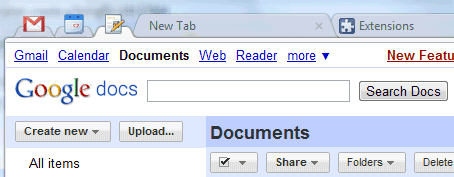
If you use Google Chrome Dev Channel or a recent Chromium build, you can install 3 Google apps: Gmail, Google Calendar and Google Docs.

"An installed web app could be separated visually from other tabs, could integrate better with the OS, and could be granted increased permissions. Installing a web app in Google Chrome is easy and quick, with no restart required. At its simplest, installing a web app is like creating a super-bookmark to it," explains Google.


To install a web app, you need to write a small Chrome extension that includes one or more icons, the URLs used by the applications and the permissions that are required.

Chrome already includes extensions for 3 popular Google services and here's how to add them:

1. Make sure you use Chrome Dev Channel 6 or a recent Chromium build.

2. Edit Chrome's desktop shortcut and add a command-line flag. In Windows, right-click on the shortcut, select "Properties", append a space followed by --enable-apps in the Target field and restart Chrome.

3. Open Chrome, go to chrome://extensions and click on "Developer mode".

4. Click on "load unpacked extension" and navigate to Chrome's resources folder. Here's the location of the folder in Windows:

%USERPROFILE%\AppData\Local\Google\Chrome\Application\[Version]\resources (Vista, Windows 7)
%USERPROFILE%\Local Settings\Application Data\Google\Chrome\Application\[Version] \resources (Windows XP)

5. Click on one of the three folders: gmail_app, calendar_app, docs_app and repeat the steps 4-5 for the other two folders.

6. To add the applications to the tabstrip, you need to click on the icons from the new tab page.


Web apps are added to the new tab page, they use special pinned tabs that no longer include the Omnibox and the Gmail app has an option for desktop notifications, which doesn't seem to be enabled.

"Once installed, a web app gets a big icon in Google Chrome's app launcher area, as well as some integration with the host OS. When running, an installed web app has a special frame and other UI enhancements to make the web app easier to distinguish from other web content. This special treatment makes running apps easier to find and prevents accidentally opening multiple copies of them."

Google will launch a Chrome Web Store for web apps, where you'll be able to find an install other applications. Until then, you can create extensions for your favorite web apps.

Monday, June 28, 2010

Google Chrome Tests Unified Menu

Google started to test an unified menu in the latest Chromium and Google Chrome dev builds. The new menu includes most of the options that were available in the page and tools menus.

If you use a recent Chromium build or Google Chrome dev channel, you can enable this feature by adding a command-line flag to the desktop shortcut: --new-wrench-menu.


To make the menu more compact, Google uses a single menu item for cut, copy, paste and another menu item that combines zoom options with full-screen.

Opera already uses an unified menu that replaces the menu bar, while Firefox 4 will include a single menu button. The unified menu takes up less space, it's less complex and it reduces clutter.

"The general purpose of the menubar is to contain all of the things that you want your program to do but you can't cram into the main UI. So the menubar generally ends up with a lot of stuff that isn't used very often, if at all, and yet is reproduced on every window and takes up a significant amount of real estate. It also has the tendency to become a dumping ground for new or hardly used features. Starting with Vista, and continuing with Windows 7, the menubar has been systematically removed from Windows applications built by Microsoft and other vendors. It has been replaced with alternatives like the Windows Explorer contextual strip or the Ribbon found in Office 2007," explains Mozilla's wiki.

Thursday, June 17, 2010

Built-in PDF Reader for Google Chrome

Chromium's blog announced that the latest Google Chrome dev build for Windows and Mac includes a plug-in for viewing PDF files. The plug-in can be enabled by going to chrome://plugins/ and clicking on "Enable" for the "Chrome PDF Viewer" plug-in.

When you click on a link to a PDF file, Chrome no longer opens the file using the Adobe Reader plug-in. Instead, Google Chrome uses a basic PDF viewer that lacks many useful features like pagination and bookmarks.


"PDF files will render as seamlessly as HTML web pages, and basic interactions will be no different than the same interactions with web pages (for example, zooming and searching will work as users expect). PDF rendering quality is still a work in progress, and we will improve it substantially before releasing it to the beta and stable channels. To further protect users, PDF functionality will be contained within the security sandbox Chrome uses for web page rendering. Users will automatically receive the latest version of Chrome's PDF support; they won't have to worry about manually updating any plug-ins or programs," explains Google.

This is especially useful for Chrome OS users, who won't be able to install PDF viewers like Adobe Reader or Evince. Instead of relying on Google Docs Viewer, Chrome will be able to display PDF files faster, especially if they're saved locally.

{ Thanks, Arpit. }

Synchronize Google Chrome Extensions

After adding support for synchronizing bookmarks, preferences and themes, Google Chrome tests a new option that synchronizes extensions and their settings. The feature is available in the most recent Dev Channel build, but you need to add two flags that enable this feature:

--enable-sync-extensions --sync-url=https://clients4.google.com/chrome-sync/dev

For example, in Windows you need to edit a Chrome shortcut: right-click on the shortcut, click on "Properties" and append a space followed by the flags above to the target field.

I tried this feature using the latest Dev Channel build for Windows and a recent Chromium build. Most changes are synchronized almost instantly, but not everything is synchronized: Greasemonkey scripts are ignored and uninstalling extensions doesn't propagate to other clients.

It's important to keep in mind that this is an initial implementation of the feature and that Chrome Dev Channel releases are buggier and less reliable than the stable releases.

Chrome Dev Channel and Chromium, using the same extensions

On Google Chrome's Lack of Native Support for Feeds

Google Chrome is the only popular browser that doesn't have native support for feeds: it doesn't detect or preview feeds and it doesn't let you subscribe to feeds using your favorite feed reader. Most of these features are available in Firefox, Opera, Safari, Internet Explorer, but they're implemented in Chrome using an extension.

Chrome's RSS subscription extension was supposed to be bundled with the browser, but it was no longer included because not many people subscribe to feeds and the orange icon would've been distracting. A Google Chrome engineer offered a more detailed explanation:

"We originally intended to include RSS support by default as a native feature of Google Chrome (and we still might in the future) but we decided instead to implement this as an extension. This decision was made based on our philosophy of trying to limit ourselves to adding only the UI features that a vast majority of users need and allow each user to customize the browsers to fit their needs with Extensions. Given that most people are not familiar with and don't consume RSS feeds, we thought that RSS support would be a better fit as an extension, at least to begin with."

Here's what you see when you click on a link to the Slashdot feed:


... and here's the same feed if you use the RSS subscription extension:


Maybe not all users know the definition of a feed, but not many people know what a browser is and that doesn't stop them from using a browser. Orange icons for feeds are everywhere and many sites display them prominently.

It's strange to see that Google Chrome doesn't have native support for feeds, while Google Reader is the most popular online feed reader, Google's FeedBurner is the most popular service for managing feeds, most Google search services have feeds for search results and even Chrome's blog links to an Atom feed.

What's even more surprising is that Chrome doesn't parse XML feeds to show a human-readable preview. Google Chrome doesn't even recommend users to install the RSS subscription extension.

If you'd like to see native support for feeds in Google Chrome, star this issue.

Tuesday, June 15, 2010

What's Still Missing in Google Chrome?

When Google released Chrome almost two years ago, many people complained that Google's browser lacked basic features that were available in all the other browsers, it didn't support extensions and could only be installed in Windows. Since then, Google Chrome has added many missing features (bookmark manager, form autofill, options for disabling cookies, images and scripts, full-page zoom, themes, extensions), the browser has been ported to Mac and Linux and it continues to be fast and to evolve rapidly.

While Google Chrome focuses on implementing useful features for improving the transition to web apps (HTML5 features, cloud printing, desktop notifications, extensions for web apps, Native Client, WebGL), many basic features are still missing. Google Chrome still can't print selected text and lacks print preview (both features should be available in Google Chrome 6), you still can't drag text from a tab to another tab, there's no way to find the size of an image or to automatically clear the cache when closing the browser.

What other basic features would you like to see in Google Chrome? Please keep in mind that Google Chrome is a minimalist browser and it shouldn't include features that would be used by a small number of people or features that could be implemented as extensions.

Google Chrome's homepage in Google Chrome 1


Google Chrome's homepage in Google Chrome 5

Tuesday, May 25, 2010

Google Chrome 5 Stable Released

Google launched the first stable version of Google Chrome that's available for Windows, Linux and Mac. Google's browser has been initially released for Windows and then it was ported to Linux and Mac.

As this image shows, it wasn't easy to port a complex Windows application to other operating systems:


... but the results are surprisingly good:


The Mac version has a polished UI and great features that aren't available in Safari: full-screen mode, bookmark sync, extensions and themes. Some Windows users would probably like to see the menu from Google Chrome for Mac.

Chrome's Linux version has improved a lot since the first dev channel release and will probably compete with Chromium, the open-source version of Google Chrome. For those who don't like the GTK+ theme, Chrome lets you enable the classic theme from Windows.

Chrome 5 has many small new features: extensions in incognito mode, reordering toolbar buttons, disabling individual plug-ins, native geolocation, new bookmark manager which is now a web page, zoom settings saved for each domain, Integrated Windows Authentication and more. It's also much faster than Chrome 4. An important missing feature is the built-in Flash plug-in, which will be added in a future update, when Adobe launches Flash 10.1.

Thursday, May 20, 2010

Google TV Announced

Google TV is a new platform that aims to bring the Web to TVs. Google developed a custom Android version that runs Google Chrome and improves the TV viewing experience by allowing you to find TV programs, showing recommendations and integrating content from the Web.

"With Google Chrome built in, you can access all of your favorite websites and easily move between television and the web. This opens up your TV from a few hundred channels to millions of channels of entertainment across TV and the web. Your television is also no longer confined to showing just video. With the entire Internet in your living room, your TV becomes more than a TV — it can be a photo slideshow viewer, a gaming console, a music player and much more," explains Google.

Google's demo from the Google I/O conference wasn't very convincing. Google acknowledged that many other companies tried to create similar products without too much success. The explanation is probably that they were ahead of their time, but Google says that they were unsuccessful because they dumbed down the Web experience, they were closed and users had to choose between watching TV and browsing the Web.

"The project started 2½ years ago, with a vision of a walled garden of TV-optimized web services. But the landscape keeps shifting, particularly in the capabilities of mobile devices. The only solution big enough for the problem is to bring the whole web to your TV," says Vincent Dureau, who is in charge of Google TV.

Google partnered with Sony, Intel and Logitech to add Google TV to "televisions, Blu-ray players and companion boxes". The first Internet-enabled TV that runs Google's software will be launched this fall by Sony and it promises to provide "richer internet access so you can browse the web just like you would from a computer."

But why not connect your TV to a computer? Android is a great operating system for a mobile phone, but it doesn't look very well on a big HDTV. Not all the Android applications are useful on a TV and those that are useful won't take advantage on the huge screen estate of the TV. Google promises to introduce a Google TV SDK and some APIs for web applications, but that will happen next year.

Google TV has a lot of potential and I'm sure it could eventually become a great product. The software could make TV programs more interactive by detecting phone numbers, addresses or URLs, it could allow you to chat with a friend while watching the same TV show, it could create chat rooms for everyone who watches the same show, it could use visual search to show information about an object from the screen or it could translate a foreign-language movie.

If you already have an Android phone, you can use it as a remote control. Since the TV and the phone can run the same applications, you'll be able to sign in using the same Google Account and synchronize your data. Favorite an YouTube video on a phone, watch it later on your TV and use it to generate a list of recommended TV shows.


Can we switch to the other box?

Google Chrome Has 70 Million Active Users

Google showed an interesting chart yesterday at the first Google I/O keynote. The number of Google Chrome users more than doubled in less than a year from 30 million users in July 2009 to 70 million users today. It's worth pointing out that this is the number of active users, not the number of Google Chrome downloads.


Asa Dotzler has a similar graph for Firefox, which shows that Firefox grew from 265 million users to 365 million users in the same period. To put things in perspective, Firefox has 5 times more users than Google Chrome.

It's a great achievement for Google and Chrome's market share will increase as the stable versions for Linux and Mac are released and Chrome OS becomes available. Even if you won't use Google Chrome, your browsers will be better because more people care about browser speed, process isolation and simple user interfaces.

Wednesday, May 19, 2010

Google Chrome Web Store

One of the reason why mobile app stores are successful is that applications are more discoverable. Users know where to find applications, there's a consistent interface for ratings and reviews, an easy way to buy applications and to compare them.

For web applications there's no web store and it's not always easy to find a good web app. Since Google Chrome OS is an operating system designed for running web apps, it's really important for Google to provide a list of high-quality web applications. Users may need an online photo editor, a music player, a chess game, a Math software or an online IDE.

Chrome Web Store will be launched later this year and intends to be "an open marketplace for web apps". Users will be to "install" applications by adding a shortcut to the new tab page. When you "install" an application, it can integrate with the browser by using advanced features that require permission: local storage, user's location, notifications.


"An installed web app could be separated visually from other tabs, could integrate better with the OS, and could be granted increased permissions. This special handling of web apps is exactly what we're working on in Google Chrome. Installing a web app in Google Chrome is easy and quick, with no restart required. At its simplest, installing a web app is like creating a super-bookmark to it. Once installed, a web app gets a big icon in Google Chrome's app launcher area, as well as some integration with the host OS," explains Google.


Even if the web applications from the Chrome Store will work in other browsers, Chrome will include some features that make it easier to use the applications. It will be interesting to see how many paid apps from the Chrome Web Store will be successful.

Update: You can already install applications in the latest Chromium builds. This post explains how to add the "enable-apps" flag and shows an example of application.

Tuesday, May 4, 2010

10 Things to Try in Google Chrome 5 Beta

If you're using the stable version of Google Chrome, the latest beta release (Google Chrome 5.0.375.29 for Windows, Mac and Linux) will be a pleasant surprise. Here are 10 things you should try after installing Chrome 5 beta:

1. Google Chrome remembers zoom settings for each domain. Go to http://www.nytimes.com, zoom using Ctrl+ or Ctrl-, close the tab and reopen it.

2. Remove individual items from the history. Go to the History tab (Ctrl+H), click on "Edit items", select the pages you want to remove and click on "Remove selected pages".

3. The new bookmark manager is an HTML page that opens in a new tab. It looks better than the previous manager and it has the advantage that extensions will be able to add new features.


4. Google Chrome can synchronize themes and preferences, in addition to bookmarks.


5. Google Chrome includes Adobe's Flash plug-in, so you no longer have to install it or worry about keeping it up to date. Open a site that uses Flash, right-click on a Flash object and select "About Adobe Flash". You should see the message "You have version 10,1,53,22 installed".

6. Disable individual plug-ins. Go to chrome://plugins/ and disable the plug-ins you don't need. You can disable Google Gears, Adobe Flash, Google Update or any other plug-in installed on your computer.

7. Extensions in incognito mode. Chrome disables all extensions in incognito mode, but you can manually enable some of them from the Extensions page.

8. Native geolocation. The previous Chrome versions used the Google Gears implementation, but Google Chrome now supports HTML5 geolocation, so that more web applications can easily find your location. Go to Google Maps, click on the small circle above the Street View logo and you'll see an infobar: "maps.google.com wants to track your location".

"If you allow Google Chrome to share your location with a site, the browser will send local network information to Google Location Services to get an estimate of your location. The browser can then share your location with the requesting site. The local network information used by Google Location Services to estimate your location includes information about visible WiFi access points, including their signal strength; information about your local router; your computer's IP address," explains Google.

9. Manual translation. Now you can disable the auto-translation feature and still be able to use the built-in translator. Even if you disable the Google Translate integration from Settings/Under the hood, you can still right-click on a page and select "Translate to English".

10. Reorder extension buttons. You can change the order of the buttons installed by Google Chrome extensions using drag & drop and even hide some of the buttons.


Bonus enterprise feature. Google Chrome now supports Integrated Windows Authentication. If you have access to an intranet site that uses Microsoft IIS and requires NTLM authentication, open it in Chrome 5. This is one of the most requested Chrome features, after the support for Core Animation NPAPI, extensions and a bookmark manager.

For those who are wondering, Google Chrome 5.0.375.29 is the latest beta and the latest dev release for Windows, Mac and Linux. This page shows the most recent two releases for all Chrome flavors.

Friday, April 23, 2010

Two Beautiful Ads for Google Chrome

Even if you don't like Google Chrome, you have to admit that the ads promoting Google's browser are well-crafted. Take, for example, this ad for Google Chrome extensions, which promotes a modern technology using old-fashioned cinematic tricks.

"In keeping with the rustic feel of the ad, the music used is Fats Waller's (Do You Intend to Put an End to) A Sweet Beginning? To keep the explanation simple, ad agency BBH New York has used rudimentary mechanical images, such as a bird popping out of a cuckoo clock and tweeting in the corner of a computer screen and a hamster running in a wheel to drag actual bookmarks between two computers," reports The Guardian.


A second ad promotes the built-in translation feature launched in Google Chrome 4.1. "Both [films] are un-tech-like product demos, showing the work and genius going on behind creating something that is essentially very simple to use," explained Pelle Sjoenell, the executive creative director at BBH.


{ Thanks, François. }