Google's toolbelt, the sidebar displayed on the search results pages when you click on "show options", has been updated with new features. There's a new option that lets you restrict results to blogs and an option to see web pages indexed by Google in the past hour (the date range can be customized by changing Google's URLs).
If you don't want to see shopping sites in the list of search results, click on "fewer shopping sites" and Google will remove the results from sites like Amazon, BestBuy, eBay. Google also offers the option to see "more shopping sites" in an interface optimized for price comparison.
If you're logged in to your Google Account and the web history service is enabled, you can restrict the results to the web pages you've already visited. By default, Google Web History only tracks the search results you visit, but you can extend it to your entire browsing history.
Google's toolbelt starts to become crowded and it's not easily discoverable, but it's a better place for refining results than the advanced search page because you can combine filters and see the results instantly.
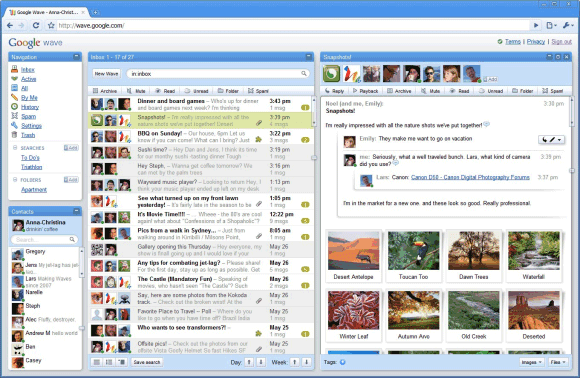
Google Wave is about to open to new users. Starting today, Google will send 100,000 invites to some of those who were eager to use an early version of the service. Google's blog lists three categories of users that will receive invites: Google Wave Sandbox users, those who signed up and offered to give feedback on Google Wave and some Google Apps users. When you receive an invitation to Google Wave, you'll be able to invite other people so you can use Google Wave together.
"Google received more than 1 million requests to participate in the preview, said Lars Rasmussen, engineering manager for Google Wave, and while it won't be able to accommodate all those requests on Wednesday it is at least ready to begin the next phase of the project," writes CNet.
Like Gmail's early version released in April 2004, Google Wave lacks many basic features: you can't remove someone from a wave, you can't configure permissions or write drafts. The interface is not very polished and some of the options are difficult to find, but it's important to keep in mind that Google Wave is just one of the ways to implement an open protocol. Gmail revolutionized email with an interface inspired by discussion boards: messages are grouped in conversations and it's easy to handle a large amount of messages. Google Wave wants to revolutionize real-time communication by extending a protocol mostly used for instant messaging, XMPP.
Combining email, instant messaging and wikis seems like a recipe for confusion, but Google Wave pioneers a new generation of web applications, where everything is instantaneous. As Google explains, each wave is a hosted conversation and users can edit the conversation in real-time.
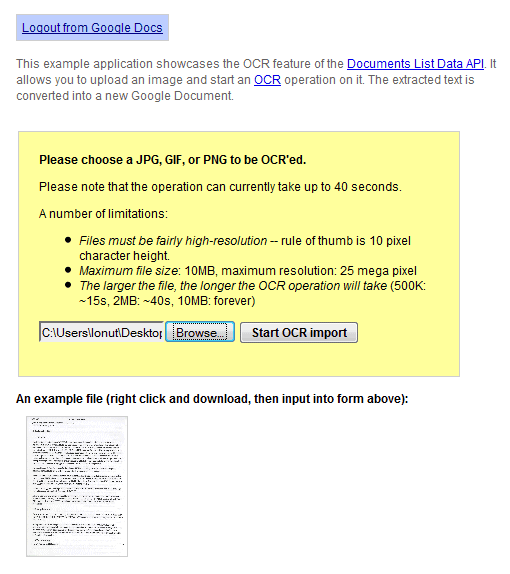
Google Docs API tests a new feature that lets you perform OCR (optical character recognition) on an image. There's a live demo that illustrates this feature: you can upload a high-resolution JPG, GIF, or PNG image that has less than 10 MB and Google Docs extracts the text and converts it into a new document. Google mentions that "the operation can currently take up to 40 seconds" and a small test showed that the service is not yet reliable: it's slow and it frequently returns errors.
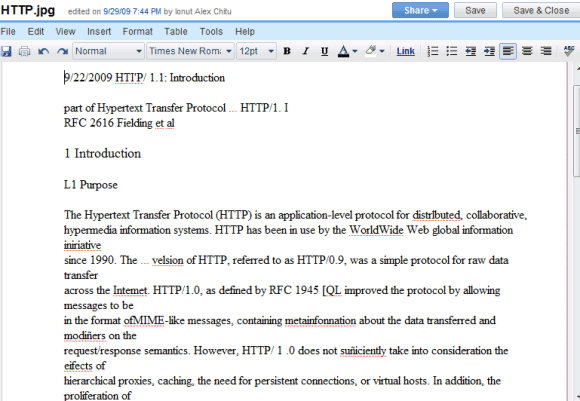
The results are far from perfect and you'll find many errors, but the service is free and it's constantly improving. Here's the result of the OCR for this scanned document:
There aren't many free OCR services available, so an OCR service provided by Google would be very popular. ABBYY FineReader Online is one of the best online OCR services, but the free version is limited to 10 pages a day.
Google sponsors the development of an open-source OCR software called OCRopus, but it's not clear if the online service provided by Google Docs uses OCRopus.
Google started to show an OneBox at the bottom of the search results for the queries listed in Google Hot Trends. The OneBox mentions that a certain query is "#N of 100 most popular searches in the past hour", even though Google Hot Trends doesn't aggregate the most popular searches, which are pretty boring and don't change very often. As Google's blog explains, "Hot Trends lists the fastest rising searches on the web at any given hour".
Google uses the fact that a query is suddenly popular in various ways: for example, to include recent web pages in the list of top results or to show results from Google News and Google Blog Search. Unfortunately, Google Hot Trends doesn't do a good job at explaining why a certain query is popular, so Google should add more real-time news sources like Twitter, Flickr, YouTube.
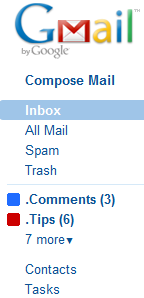
If you have a lot of labels in Gmail, it's difficult to see all of them without scrolling down. In July, Gmail added an option to hide some of your labels, so that the most important labels are always visible. Unfortunately, if you receive a message that's automatically labeled using a filter and the label is hidden, you'll miss the message.
A new feature from Gmail Labs solves this problem: enable Hide read labels and "the visible labels in the navigation bar will be hidden under the 'more' menu when they don't contain any unread conversations".
Since the feature only hides visible labels, you can go to the label management page and click on "show all" next to your labels. If all your labels are visible and Hide read labels is enabled, Gmail will only show the labels that include unread messages.
Google Reader has a similar feature: if you click on the arrow next to your subscriptions and select "show updated", you'll only see the folders and the feeds with unread items.
Google has a partner program for Street View. "Do you manage a unique property (pedestrian mall, amusement park, university campus, etc.) that users would like to visit in Street View? Through our Partner Program, you can now request Google to collect imagery of your location. Once the images are added to Street View, people all over the world will be able to virtually explore your property."
For now, the program is limited to properties that are interesting to Google's users. Some of the examples included in the FAQ: "zoos, parks, universities, amusement parks, outdoor marketplaces, stadiums, monuments, tourist destinations, and race tracks".
Here's a Street View tricycle at the Palace of Versailles:
Google has released an API for Google Sites that lets you create or edit pages, upload or download attachments, monitor the activity of a site programmatically. The API could be use to create a new interface for Google Sites, to upload files from other sources or to migrate your data.
Google's Data Liberation team built a Java application for importing and exporting Google Sites. The application lets you export the pages from a site and all their attachments to a folder.
"The folder structure of an exported site is meant to mimic the Sites UI as closely as possible. Thus if exporting to a directory "rootdirectory," a top-level page normally located at webspace/pagename, would be in a file named index.html, located in rootdirectory/pagename. A subpage of that page, normally located at webspace/pagename/subpage, would be in a file named index.html in rootdirectory/pagename/subpage. Attachments are downloaded to the same directory as the index.html page to which they belong," mentions the user guide.
You should only enter the domain name if you use Google Apps. "Webspace" is the name of your site: http://sites.google.com/site/sitename/.
Unfortunately, you can't use this tool to import HTML files to an existing site. The importing option is only useful for the sites exported using the same application.