Thursday, February 7, 2008

iGoogle's Settings Page

Google's personalized homepage (a.k.a. iGoogle) has a settings page where you can change the language, your location and some things related to tabs (name, theme, layout). You still can't reorder the tabs or make some special changes that aren't available in the main interface.

The settings page would probably be more useful if it had support for batch operations like deleting multiple gadgets or moving all the gadgets that contain "Google" in the title to a new tab.

Local Sections in Google News

There's a new type of section you can add to Google News: the local section. Type your location (or any other location) and Google will show you the most relevant news related to your location. Until now, you could create a custom section that showed the most important news that contained your terms, but the new location does a better job at identifying locations.

"While we're not the first news site to aggregate local news, we're doing it a bit differently -- we're able to create a local section for any city, state or country in the world and include thousands of sources. We're not simply looking at the byline or the source, but instead we analyze every word in every story to understand what location the news is about and where the source is located," mentions Google News Blog.


You can create as many local sections as you want by clicking on "Edit this personalized page" and selecting "Add a local section". It would be nice if Google News adds the layout options from iGoogle and makes it easier to rearrange the sections and add new content. Google could also display a lot of interesting content about a location (popular videos, photos, blog posts, events, community maps) in a special iGoogle tab.

Wednesday, February 6, 2008

Add Data to Google Spreadsheets Using Forms


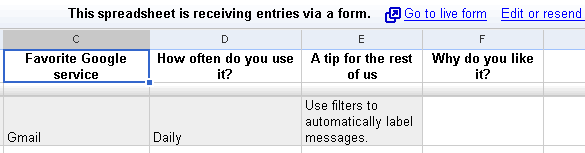
Google Spreadsheets has a new feature that lets you create a form to accept data. When you go to the Share tab, there's a new option to "invite people to fill out a form". The form is very simple and can be customized by changing the order of entries, their labels and the type of answers. It's also a nice way to get feedback people who wouldn't normally collaborate on a spreadsheet.

You can create forms from spreadsheets or using this URL. To keep track of your forms, add this gadget to iGoogle.

I created a form that lets you add your favorite Google service (the form has a public page that I embedded below) and here's the entire spreadsheet with all the answers.


Update. Here are the results of your votes:

A More Powerful Google Navigation Bar

iGoogleBar is a Firefox extension that enhances Google's navigation bar by showing the number of unread Gmail messages (only from the inbox) and the number of unread posts in Google Reader. The extension also adds icons that open Google gadgets for each service so you can preview your Gmail inbox from Google Calendar or open a recent document from Google Notebook.

For example, in the screenshot below, I visit Google Docs, but I can see that there is a single new post in Google Reader, only two unread messages in my inbox and I can easily open a bookmark from Google Notebook.

Unfortunately, the new navigation bar is displayed after the page loads, it works only in Google's communication apps and it doesn't include the More dropdown. Another big drawback is that the extension is actually a Chickenfoot script that comes with its rendering engine, which is terribly slow. In fact, the extension's XPI file has 1 MB, almost the same as Google Toolbar for Firefox.


{ via Googlified }

Google Offers Security Services for Mail Servers

Google acquired last year Postini, a company that offered hosted services for email servers. "Postini invented the software as a service approach to providing communications security and compliance, and holds two fundamental patents in the space, with more patents pending." Google integrated a small part of the offering in Google Apps Premier Edition: policy management, spam/virus filtering and 90-days message recovery.

Now Google offers the rest of the Postini services under the Google Apps umbrella, but without tying them with Google Apps Premier Edition and Gmail. Google Apps Security Services work with the most important email servers (Microsoft Exchange Server, Lotus Domino, Postfix, Sendmail, Macintosh OS X Server, Novell Groupwise) and offer three levels of protection, priced differently:


* message filtering: anti-spam, anti-virus, anti-phishing, and malware protection for inbound messages - $3/user/year
* message security: inbound and outbound mail filtering, email encryption, content policy management - $12/user/year
* message discovery: the same as above plus one-year message archiving, audit reports - $25/user/year

For educational institutions and non-profit organizations, the prices are much smaller: $1, $4 and $8.33/user/year. For all the services, Google provides 99.999% service level assurance.

Here's how the service works: you change the MX records to point your mail traffic to Google's data centers and all the bad traffic will be stopped before reaching your mail server. Google processes email in RAM and doesn't write the valid messages to disk.
Google provides multiple layers of protection against viruses. The service leverages its visibility to emerging threats by monitoring attacks against our customer base and - in real-time - blocks IP addresses that are issuing virus attacks. In addition, Google utilities multiple anti-virus protections including zero-hour heuristics, coupled with multiple commercial anti-virus engines to detect existing and emerging threats.

As with our virus protection, Google leverages visibility into billions of daily message connections to monitor spam attacks and blocks the most obvious spam. Our heuristic engine then filters the incoming mail traffic and captures any suspicious messages. This is all performed in real-time (processed in RAM memory in our data centers) without delays to your email delivery. With these capabilities, Google combines an extremely effective capture rate with an exceptionally low false positive rate.

Google says that Postini already has 40,000 customers and 14 million users and these affordable prices should increase the user base. Unfortunately, the association between these security services and Google Apps might confuse the potential clients and make them think that the services are only available for Gmail.

In fact, Gmail already includes anti-spam, basic anti-virus, anti-phishing and the corporate version of Google Apps includes content policy management and basic message archiving at no additional cost. Maybe Google will use the data obtained from Postini's services to enhance Gmail's security features.

Monday, February 4, 2008

Could Google Save Yahoo from Microsoft?


Even if it's hard to believe that Yahoo will accept it, there's a simple way to make Yahoo more profitable: drop its search advertising service and use Google AdWords. Google has a better technology for ranking ads, a bigger inventory and higher click-through rates. If Google accepts to offer Yahoo most of the earnings, it's likely that Yahoo's profits will make investors happy again.

According to Wall Street Journal, "Google Inc. Chief Executive Eric Schmidt called Yahoo Inc. CEO Jerry Yang to offer his company's help in any effort to thwart Microsoft Corp.'s unsolicited $44.6 billion bid for Yahoo, say people familiar with the matter. (...) Google could play a role in attempts by others to outbid Microsoft, or by Yahoo to remain independent. Google could potentially offer money, or guaranteed revenue in return for a Yahoo advertising outsourcing pact, under that scenario."

There are rumors that Yahoo already negotiates with Google the outsourcing of its search ads in Europe. This could be a good news for Google, who also provides ads for Ask.com.

In a harsh post from the official Google blog, David Drummond is worried that Microsoft's acquisition of Yahoo could jeopardize Internet's openness: "Could Microsoft now attempt to exert the same sort of inappropriate and illegal influence over the Internet that it did with the PC? While the Internet rewards competitive innovation, Microsoft has frequently sought to establish proprietary monopolies -- and then leverage its dominance into new, adjacent markets. (...) Microsoft plus Yahoo! equals an overwhelming share of instant messaging and web email accounts. And between them, the two companies operate the two most heavily trafficked portals on the Internet. Could a combination of the two take advantage of a PC software monopoly to unfairly limit the ability of consumers to freely access competitors' email, IM, and web-based services?"

It's not clear if Google is truly worried by this potential acquisition, since a Microsoft+Yahoo company would be very far from Google's dominant position in search and search ads*, while Yahoo's absorption would take a lot of time. Microsoft has already admitted that it can't compete with Google online by trying to acquire Yahoo and it chose a very bad moment in Yahoo's history to force the acquisition.

* According to Microsoft, Google gets 75% of worldwide revenues in search ads and has 65% search market share in the US and 85% in Europe.

Saturday, February 2, 2008

Data Visualization Google Gadgets

Last year, Google acquired a data visualization technology from Gapminder, a Swedish non-profit organization. Gapminder's technology, Trendalyzer, was used to visualize data from United Nations Common Database in an intuitive way. To quote from Gapminder's site, "this software unveils the beauty of statistical time series by converting boring numbers into enjoyable, animated and interactive graphics." For example, you could see the evolution of carbon dioxide emissions in a country over time or find correlations between CO2 emissions and the income per capita.

Google probably intends to use this technology to visualize custom data. One of the interfaces that will allow you create your own Trendalyzer visualizations is an iGoogle gadget which creates a Flash multi dimensional chart. The input is a file with the following structure: the first column is the item's name, the second is time, the third is for x-coordinates, the forth is for y-coordinates, and the fifth is the size of a ball. I tried to upload a file that has this structure, but the gadget didn't accept it. The gadget is probably a part of a new service that also hosts your data.


This is not the only data visualization gadget developed. Another gadget creates an interactive table that supports filtering and grouping, the simple table gadget lets you perform queries, while the heat map gadget "displays a map with color intensities that match given values". There are also gadgets for pie charts, column charts, bar charts, area charts, image lines, scatter charts, organizational charts, time series.


Hopefully we'll be able to actually use these gadgets and Google will create a service around visualizing data.

Update: The gadgets are a part of a new Google Spreadsheets feature.