Tuesday, February 12, 2008

Street View Update: 12 New Cities

About every two months, Google Maps adds 6-7 new cities to Street View. In May 2007 the service was launched with images for 5 cities, two months later 4 new cities were added, in October Google added 6 cities, while in December a record of 8 cities were added to Street View.

This month, Google added 12 new cities from the US: Juneau (Alaska), Boise (Idaho), Salt Lake City (Utah), San Antonio (Texas), Raleigh/Durham/Chapel Hill (North Carolina), Manchester (New Hampshire), Kansas City (Missouri), Milwaukee (Wisconsin), Albany, Schenectady (New York). It's interesting to see that the 12 cities are distributed uniformly and the total number of cities is now 35.

When do you think Google will add all the important cities from the US and the rest of the world? Shouldn't Google outsource this job to other companies or at least accept photos from users and use technology like Photosynth to combine them?

Bonus question: can you find the formula for an integer sequence that has the first 5 values: 5, 4, 6, 8, 12?


{ via the unofficial Google Earth Blog. Updated with more information from Google LatLong. }

Designing Google's Logo

Wired has an article about the design of Google's logo and its iterations. "Ruth Kedar, the graphic designer who developed the now-famous logo, shows the iterations that led to the instantly recognizable primary colors and Catull typeface that define the Google brand. Kedar met Google co-founders Sergey Brin and Larry Page through a mutual friend nine years ago at Stanford University, where she was an assistant professor."

In the process, Ruth used a lot of symbols: from a pattern that suggests the infinite to interlocking rings that symbolize the power of search to transgress cultures, from a happy magnifying glass to sheer playfulness. "By taking out the magnifying glass, Kedar opens up the logo to signify that Google can become much more than just a search engine. By playing with the angles and colors of the letters, she tries to make clear that Google isn't a square corporation."

Ruth Kedar explains that she chose the Catull typeface because "Catull borrows elements from traditional writing instruments such as the quill and the chisel with a modern twist. Search, by nature, is an activity that requires we look into the past. Therefore Catull's historical ties seemed appropriate, as did the bridging between the old analog world and the new emerging digital era."

As you can see, the simple and cheerful Google logo hides a lot of interesting ideas and it's still relevant to the company, even if it's no longer just a search engine.

Before adopting a professional logo, Google used a logo created by Sergey Brin in GIMP. "Tinkering one day with a graphics program called GIMP, Sergey created a color rendering of the Google letters with an exclamation point at the end, mimicking Yahoo! He seemed quite proud of the new logo, which was composed of kindergarten-style block letters in primary colors. But it wasn't the look that meant the most to him. He was pleased that he had been able to teach himself how to use GIMP, free software that was tricky to employ," writes David A. Vise in The Google Story.

Monday, February 11, 2008

Intuitive Mobile Search

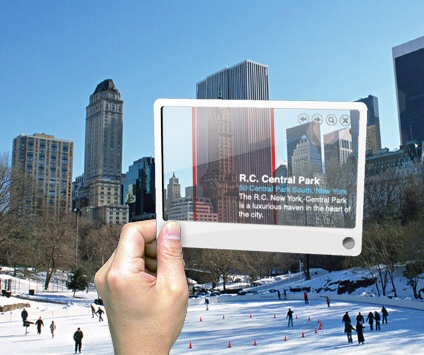
Image licensed as Creative Commons Attribution by Mac Funamizu.


Mac Funamizu imagines a more intuitive way to search by just pointing at objects or selecting text. An Internet-enabled mobile device that incorporates a camera, scanner, GPS could make use of services like Google Maps or an improved image search to recognize objects and deliver useful information about them.

"You can use it when you want to know a car model, an insect name, what kind of food is served at a restaurant and how much, who built a bridge, etc. etc. But as a designer myself, I hope it's able to tell me a name of a font of the type I see, the size, color (in RGB), and so on," explains Mac.

There are already commercial applications like GeoVector 3D Search that let users access data about some points of interest, but this could be extended to non-local search. GeoVector "currently provides products and services which significantly simplify local searches, allowing users to point their mobile device toward objects of interest to access information about them. Users can point and click with their mobile phone the way a computer user navigates using a mouse," according to a press release.

Google tests introducing barcodes in print ads to increase their accountability. "2D barcodes (...) allow readers to click on interesting print ads with their cellphones and seamlessly connect to relevant online content." A barcode could encode URLs or any other short text. "When you capture a picture of it with your cellphone, special decoding software reads the encoded information, and prompts your phone's browser to visit a URL." Barcodes are very popular in Japan, where a lot of mobile phones include decoding software. "Japan, the first country with a highly developed 3G network and high usage of the mobile internet, was also the country where telecoms like NTTDoCoMo and KDDI achieved a breakthrough by bringing QR code readers to mobile phones. Today QR Codes are so pervasive in Japan that it's almost impossible without seeing one. You can find them in advertisements, mobile campaigns, on maps, in magazines, on billboards etc. and nobody want to miss them anymore."

Point-and-click is an intuitive way to interact with objects and obtain information from search engines, but it's necessary to be able to analyze images and recognize objects, the same way barcode decoders transform codes into text. Google's acquisition of Neven Vision is a step in this direction.

Saturday, February 9, 2008

Google Shows the Indexing Date for Each Search Result

If you use Google's advanced options to restrict the search results to a certain period of time, you'll find that Google shows the date when each web page has been first indexed (in many cases, this is a good approximation of the date when a web page has been created).


As previously mentioned, you can edit Google's URL to customize how fresh the search results should be. For example, if you append &as_qdr=y9 to Google's search URL, you'll restrict the results to web pages first indexed by Google in the last 9 years. Since this restriction should include all web pages from Google's index, you can use it to display the timestamp next to each search result (e.g.: a search for iPod).

Maybe in the future Google will display the date next to each search result, it will try to approximate the date when a page has been created, allow users to filter results from certain periods and sort the results by date.

Interesting Results from Google Blog Search

Even it still has problems with duplicate content and spam, Google Blog Search has an important advantage over other blog search engines: it actually finds the most important search results. This is the default option for displaying results and it's recommended to use it even if you only want to read fresh news, as you can change the time interval to "last hour" or "last 12 hours".

Google's blog search engine lacks a homepage that displays the most important posts from the blogosphere, but there's a way to find interesting posts without entering a query. For some strange reason, if you search for [label:keyword] or [view:keyword] (keyword can be anything you like), Google ignores your query and displays a list of blog posts. We can assume it's a list of blog posts relevant for any query.


Related:
How Google Blog Search ranks results

Finding Places of Interest in Google Maps

Google Maps has a very useful mapplet (what's a mapplet?) that shows places of interest from a list of categories. You can select the mapplet by going to the My Maps tab and clicking on Featured content > Places of interest.

Instead of searching for bars, restaurants, hospitals, shopping malls, you can select these categories in the left sidebar and see all the places that match your selection. Unlike the standard search results, the mapplet shows many more places and you can use it to see the picture: for example, to estimate the distribution of restaurants in a certain area. Google Maps lets you select more than one mapplet, so you can also activate the distance measurement tool, the Panoramio layer with beautiful photos or the popular community maps.

Friday, February 8, 2008

Google Goes to Disneyland


This year, Google's employees didn't go on the traditional ski trip due to the size of the company, so they went to Disneyland for three days, from 4 to 6 February. Here's how Googlers described the trip:

"Monday through Wednesday, Googlers from the West Coast offices headed down to Anaheim for a visit to place of a 'million dreams.' Suffice it to say, it was an incredible experience. I got to go on rides I had gone on over 10 years ago - including Space Mountain, Matterhorn, and Star Tours. And, I got to ride the new rides - California Soarin', California Screamin', Buzz Lightyear, and Indiana Jones. From 8pm-1am, the park was open only to Googlers, with our very own fireworks show and no waits in the lines." (Reid)

"Tomorrow I'll be on my way (...) to LAX and then to Anaheim for Google's yearly ski-trip! Oh wait. There's no skiing in Anaheim. So what's this all about? Well it turns out that Google with its 16,805 employees is now so big that we cannot by any means rent enough rooms in Tahoe, so it was decided to give us a choice this year: Camping at the Pinnacles National Monument south of Salinas, CA (bring your own tent!) or Disneyland! Google's got the whole park just for Googlers after 8pm on Tuesday [February 5th]", writes Ulf Waschbusch.

"One of the things I can most prominently remember about my childhood is Disney cartoons. There was a stage when Mickey, Donald, Pluto, Goofy meant more in life than probably computers mean today. I visited Disneyland at Anaheim near Los Angeles. Many thanks to Google for the company trip. (...) Disneyland is a childhood dream come true. One less thing left to do in life." (Nirnimesh, a Googler from Hyderabad, India)


"Absolutely amazing time. The organization of the trip was second-to-none... pretty much what you'd expect from Google. I couldn't even imagine what a logistical nightmare organizing something like this must have been. They flew about 5,000 people down from three different airports in the bay area, to three different airports in Los Angeles area. Shuttles were organized to take us from those three airports to about 10 different hotels where the Googlers were staying. At the airports, for most of us who only had carry-on luggage, we were handed our boarding passes after showing ID and went straight to security (after waiting on a Google line for a quite some time but what would you expect?!). When we arrived at the airport (going down and coming back), there wasn't a single moment where the Googlers weren't informed where we were supposed to go to catch our shuttle. (...) There's definitely a reason why Google's the number one employer to work for. This was the most fun I've had since I moved out here." (Billy)


More photos of Google's trip to Disneyland: Arturo, Ana, Rosalie, Cynthia, Michael, Tessa, Gregory.