Wednesday, August 2, 2006

Real Player Bundles Firefox And Google Software


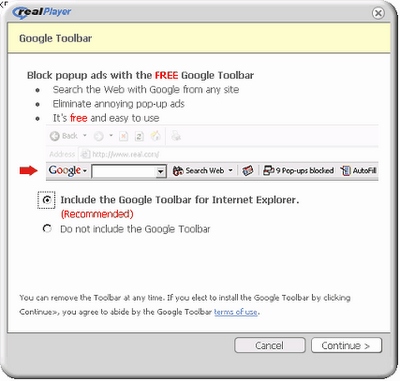
Forbes reports that RealNetworks, the creators of the (un)popular media player RealPlayer, have signed a two-year agreement with Mozilla to bundle Firefox with its software (RealPlayer, Rhapsody and RealArcade). They've also signed a contract with Google to distribute Google Toolbar and Google Desktop.

Google continues to focus on making distribution deals (see Dell agreement, Adobe deal) as a way of increasing its desktop presence. Google and RealNetworks have a long history: RealPlayer is bundled with Google Toolbar from 2004 and Google Pack includes RealPlayer as an optional download.

RealPlayer has a bad reputation, as it used to bundle spyware software and it has a bloated UI. It was ranked number two on the PC World's Top 25 Worst Tech Products of All Time:

"A frustrating inability to play media files--due in part to constantly changing file formats--was only part of Real's problem. RealPlayer also had a disturbing way of making itself a little too much at home on your PC--installing itself as the default media player, taking liberties with your Windows Registry, popping up annoying "messages" that were really just advertisements, and so on."

Many people have chosen to use Real Alternative to be able to play Real media files. Others install RealPlayer, but play the files with another compatible player.

But for Google, this is just another distribution deal.

Matt Cutts Answers SEO Questions

Google's interface with webmasters, Matt Cutts, answers more questions on Google Video.

Some of the questions:
Google terminology - What's the difference between an index update, an algorithm update, and a data refresh?

Static vs. Dynamic urls: does PageRank flow the same to both?

Does Google Analytics play a part in ranking web pages? [ Short answer: no. ]

Should I worry about results estimates for 1) supplemental results 2) using the site operator 3) with negated terms and 4) special syntax such as intitle? [ Short answer: no. ]

Which is more important: search engine optimization (SEO) or end user optimization? [ Short answer: both should be the same kind of optimization. ]

One of the best pieces of advice to follow is not to design a site with search engines in mind, because search engines are not your visitors (they crawl your site), they change the algorithms often and their main aim is to have great results for the users. So if you design a site with the user in mind, you'll know that even if a search engine penalizes you for a while, it will change its mind soon. So everytime you make a change to your site, ask this question: will it help the visitors?

Update: some partial transcripts are available at Google Blogoscoped (transcript 1, transcript 2).

Tuesday, August 1, 2006

Embed a Part of a Google Video

You could link to a part of a video, now you can set the starting point of an embedded video.

Just add this to the code generated by Google Video as an attribute of embed:

FlashVars="initialTime=2171"

The starting point is expressed in seconds, so you need to make a little conversion.

Another interesting value of FlashVars is:

FlashVars="autoPlay=true"

This way, the video starts after the page loads. This is not recommended, because a page may have more videos and users shouldn't be forced to watch your annoying video.

You can combine the values like this:

FlashVars="autoPlay=true&initialTime=2171"


{ From Google Video Blog. }

When Will You Run Out Of Gmail Storage Space?

If Gmail storage grows at a rate of about 0.33 MB per day and you use the space the same as before, is there a chance you'll run out of space? Use this simple calculator to find out (type the date in this format: Month/Day/Year).

Update (October 2007): Gmail increased the rate of growth, so if you use Gmail for a long time or you didn't use too much storage, it's likely you'll see the answer "never".

Picasa 2.5 Has Interesting Features


If you have the latest version of Picasa, namely Picasa 2.5 (available at picasa.google.com), you can find an interesting feature: search your photos by their color. You can type color:green, color:red and any other color from this list: blue, gray, yellow, orange, purple, pink, black and white (I know that black and white are not colors). It would be more useful if the photos were sorted by the predominance of the color, but you can sort them by date.

The filtering is applied as you type, so if you enter color:b, you'll see pictures that contain black spots and pictures that contain blue areas.

This type of search may be useful if you want to find a picture of someone wearing a red dress and the filenames aren't very descriptive.

Another new feature is showing duplicate files. Picasa shows only identical files, so you can delete the copies to save some space. As Picasa doesn't show the duplicate files one next to another, you can enter a keyword from their name in the search bar to show only one set of duplicates.


Picasa is integrated with Google Earth, so you can easily geotag photos (add geographical identification). Just navigate to the location depicted in the photo and press "Geotag". The photo will now have GPS latitude and longitude in the metadata. You can geotag more than one photo at a time. You can also export photos to Google Earth .kmz files, to share them with friends. Geotagging can make finding photos from a specific location an easy task.


Picasa also allows you to upload videos to Google Video. You don't have to visit the site or to use Google Video uploader. You can upload one video at a time.

All these features can be found in the Tools menu.

Related:
Picasa Web Albums
Preloard - online image editor
Use mobile phones for OCR

Create Running Routes With Google Maps


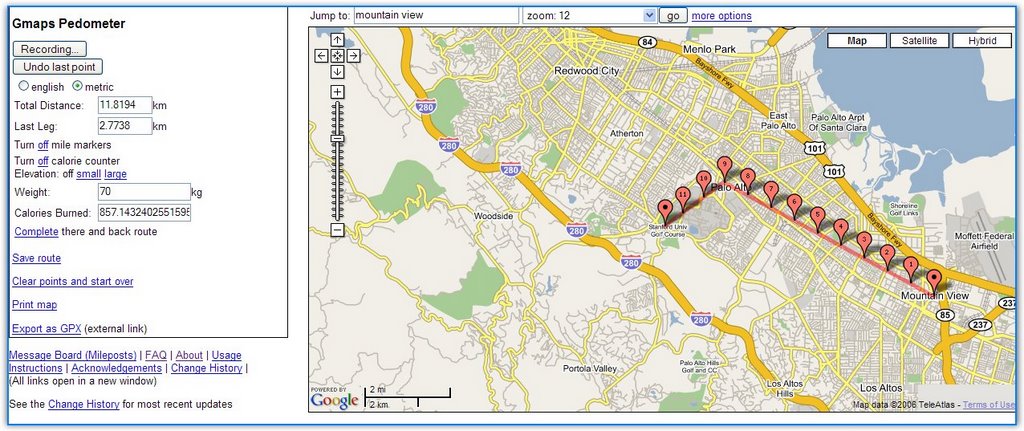
Gmap Pedometer is a site that uses Google Maps to let you record distances between two or more places. You can create routes for your running, see how many calories you're going to burn and save the route for further referencing. The author of the site explains: "As a runner training for a marathon for the first time, I found myself wishing I had an easy way to know the exact distance a certain course is, without having to drag a GPS or pedometer around on my runs." It's always a good idea to get some exercise at least once in a while, if not every day. And you can use the new iPod Nike shoes.

Related:
Google Maps with photos
Anthropomorphic Google Maps

The Next Step In Search

In the beginning, there was little content on the web so we could organize it in directories, hierarchically. Then the number of the pages has increased, and we needed search to find our way around. But searching for the text in a page wasn't enough to bring relevant results. So we looked at the links in a page, to understand the authority of a page by looking at the authority of sites that point to a page. Now we have relevancy, but the search is still textual. So the next step would be to grasp the meaning of a page and of its parts, to create a semantic web algorithmically.

Google already knows how to separate navigation of the page from the actual content, it knows how to tell bad links (affiliates, paid links) from good links, it knows the theme of a page and relevant keywords, but it can't yet divide the content into meaningful parts. If you look at product reviews, you'll find them in different places: in sites that are specialized in reviews and have a special format Google can understand (like Amazon, IMDB), in blogs, news sites, forums. Google's next step is to understand that a blog post reviews a product, to gather relevant passages, to understand if the review is positive and negative, what's good/bad about the product. So the next time you type [review iPod nano], you'll see a list of sites that review the product, grouped by positive / negative reviews and a shared vision about the product. You'll know that most people love or hate iPod Nano and their reasons in an aggregate chart.

Google could also find job descriptions, addresses, emails, events, biographies and let you search them using query-dependent parameters. The next step for Google is to structure unstructured information, and to turn the web into a Google Base.

{ Photo by Joao Bambu. }