I rarely post about topics that don't have too much to do with Google, but there's a little-known music player that deserves some recognition. MusicBee is a powerful music player and music organizer for Windows that helps you auto-tag your songs, find lyrics and album pictures, create smart playlists with related songs from Last.fm, convert songs and much more.
MusicBee manages to combine the best features from applications like iTunes, Windows Media Player or Winamp, while adding a lot of useful features that aren't available in those popular media players. For example, you can automatically fix the tags for all the songs from your music library with just a few clicks.
MusicBee has a great Last.fm integration: it automatically scrobbles the tracks you play, it lets you import your loved tracks and your playlists, it has a cool feature that imports Last.fm tags and there's also an option to sync play counts with Last.fm.
The application supports tabs and it includes a Mozilla Gecko-based browser that lets you read information about the songs you're currently listening and download songs from music blogs.
Besides the extensive support for music formats (MP3, WMA, Vorbis, AAC, FLAC), the application converts music files from one format to another and synchronizes your files with many portable devices, including iPod and iPhone.
MusicBee is probably the media player that integrates with the most popular music-related web services and the nice thing is that it's constantly improving. Steven, MusicBee's only developer, is open to feedback, sometimes implementing user suggestions and fixing bugs in less than a day after they're posted. It's amazing to see that the first version of the player has been released in December 2008.
The downside of including a lot of features is that the application might look cluttered and some features are difficult to find, but that's a small price to pay.
Google updated the music search OneBox, which used to include song titles, album names and some other information licensed from AllMusic. The new music search OneBox is only focused on finding music, previewing songs and easily buying them.
Search for an artist, an album name or even some lyrics and Google returns a list of songs that can be played with one click. Full music previews are provided by iLike and Lala, but Google also links to other music sites: Pandora, Rhapsody and imeem. When you click on a music result, Google opens a player in a pop-up window, which isn't very user-friendly.
"With Lala, you can hear one full length preview per song. Each subsequent play will be a 0:30 clip," explains Lala. This limitation is very easy to bypass: just clear the cookies for lala.com.
The OneBox is limited to the US, probably because the music sites that partnered with Google can provide full previews only in the US. I didn't manage to trigger the OneBox, not even using a US proxy. The sample searches provided by Google include some additional parameters that need to be added to a Google URL:
Google says it will be "rolling this feature out gradually to users across the U.S. over the next day".
Not wanting to feel left out, Yahoo reminds users that it launched a similar feature last year. "Since launching a partnership with Rhapsody in September 2008 and launching the FoxyPlayer last year, music has been an integral part of the Yahoo! Search experience as well. We have found that nearly 6 percent of all Yahoo! searches are music-related."
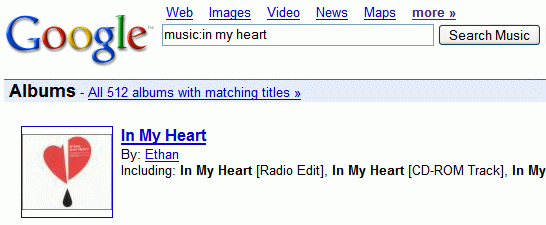
Google has a small music search engine that shows information about artists, albums and songs. You can use the music: operator in Google's search box to access the service. Unfortunately, the information is outdated, the links to reviews are broken and there's not much to see.
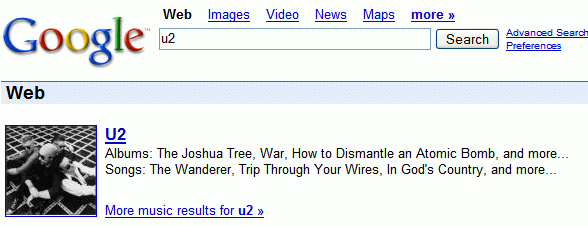
After many years of decay, Google decided to improve the service. CNet reports that Google will launch the new version of Google Music Search next week, in partnership with Lala and iLike. "The way One Box will work is that a person who keys in the names U2 or Coldplay, for example, will find a thumbnail photo of the artists, background information, as well as a listing of the music that they can preview."
"The new Google music offering will allow users to stream an entire song via a link from La La Media Inc.'s Lala.com, or a sample from MySpace's music site iLike.com. The Lala link on the Google page will let users listen to a song once free of charge. In addition to offering a free streaming link, the new arrangement will offer options to pay 10 cents for an online-only version or about $1 to download an MP3," says the Wall Street Journal.
TechCrunch has some screenshots of the OneBox and the interface resembles Yahoo's music artist shortcut. Last year, Yahoo partnered with Rhapsody to allow users to play up to 25 full songs a month.
Here are some screenshots of Google Music Search as it looks today:
Google's most popular music-related service is YouTube and it's surprising that YouTube doesn't offer a better experience for watching music videos. YouTube could easily add information about music artists, lyrics, album arts, music charts. Later this year, YouTube will launch Vevo, a site that will feature Universal's music videos.
Google China Music Search (English translation), a service launched last year by Google to better compete in a market dominated by Baidu, is now publicly accessible worldwide and it has a new homepage. The service has been created in partnership with Top100.cn to offer legal MP3 downloads.
"The venture goes directly after Baidu's music search audience, by offering high-quality music files embedded with a digital "watermark" that lets record labels track how often their songs are downloaded. The idea: Better-quality files will draw users away from unlicensed downloads, and give labels and search companies valuable data needed to make money from advertising," explained Wall Street Journal.
While the service is now accessible everywhere, you can only download music if you are in China (or if you use a proxy). Google Music has a large collection of music and there's visual tool that lets you find songs by choosing the tempo, the genre and other characteristics.
I've always wanted a music player that creates playlists based on your state of mind, but I couldn't find a good one. Musicovery is a site that lets you choose a mood (anywhere from dark to positive and from calm to energetic), a list of genres, a time period, and you get a playlist that can be listened online (in a low bitrate for free).
The songs are visually connected in a graph and when you select a song, the view centers on the current song. This reminds me of MusicPlasma, that shows music artists based on their influence and similarity.
Musicovery doesn't have a huge database, but it's a good option if you miss a dark song from the 90s or you just want to hear a relaxing song.
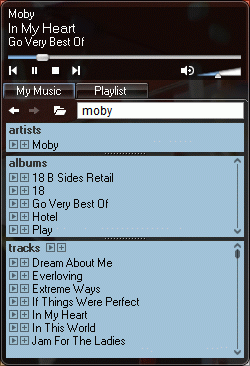
Google Music Player is a Google Desktop gadget that lets you search and play the music from your computer. Google Desktop indexes your music, but the browser is not the best place to play your music. This gadget is an easy way to build a playlist by repeatedly searching for your favorite songs, to listen an album or all the songs that match your query.
Although the player is a pretty nice exercise, Google didn't read my post from May.
When you search for a singer or a music band at Google.com, you'll notice a box above search results that shows more information.
This feature is not new (in fact, it's been available for almost a year), but many people don't know that you can trigger Google Music Search by simply adding "music:" in front of your query. Google has a big database of artists, songs and albums and everything is searchable.
So how can you use it?
1. Let's say you know the name of a song, but you don't know the artist. Search for [music: name of the song] and Google will show you all the songs that have this name. You can also use quotes if you are sure about the name.
It's easy to find albums or artists if you don't remember the entire name (for example, a British singer named Lily).
2. Maybe you know the lyrics of a song and you want to find the song. You can enter the lyrics in the regular search and you may find it, but if the song is not very popular or if there are more songs that have similar lyrics, it's a much better idea to use Google Music Search. This way, you'll get unique songs as search results.
"Mercora's mission is to catalog and organize the world's music and make it universally searchable and legally listenable." Sounds familiar?
Mercora is a radio network that lets everyone create a radio station and stream music in a P2P fashion (people can't download music). You can invite your friends and listen to their music, search for an artist and find all his albums or just choose a genre. Mercora lets you discover similar artists, read biographies and add comments.
The software, Mercora IMRadio, has a social side, as you can log in with the username/password for an instant messaging client (Google Talk included) and invite your contacts. You can create a profile, interact with other users, share photos and much more.
Regarding copyright, Mercora says: "you can webcast any music that you own legally. These recordings must originate from an authorized source (either created originally by the artist or record label that owns the copyright), and are not unlawful copies that have been downloaded illegally or obtained from an unauthorized third party."
Mercora IMRadio is a freeware for Windows 2000 and Windows XP. It uses an open source format for streaming (OGG Vorbis) and it depends a lot on network connection speed, so you may notice buffering problems.
Good things are simple and come in small packages. If you wanted a plugin for your music player that finds and displays lyrics for your songs, Lyrics Plugin is a good answer. It's free, small (around 60 KB) and available for Winamp and Windows Media Player. You don't have to configure anything, the plugin works well out of the box.
The drawback of this plugin is that the lyrics database is not very big, so you may still find famous songs that don't have lyrics. But it's easy to add them.
The Hype Machine is probably the coolest music search engine. That's because you can actually listen to music and because there's a lot of underground music.
The Hype Machine crawls music blogs and lets you discover songs. The site likes to think it works like Google: crawling blogs for MP3 files, storing the files in their database as a cache and offering a full preview of the songs.
"The Hype Machine exists to create a medium that favors discovery of new music through public discussion while encouraging legitimate distribution of audio." Most pages have links to music stores where you can buy the songs. There are also feeds so you can easily discover new music.
Music producers may not agree, but this is the best way to distribute and sell music: show full previews for songs and let the public decide what's cool and what's not. Now people buy popular music promoted by labels.
My favorite audio player for Windows, Winamp, has been upgraded to version 5.3 and has two new features: Winamp Dashboard and Winamp Remote.
Winamp Dashboard is a sort of personalized homepage, that lets you add widgets for news, most played songs, viral videos, Winamp skins.
Winamp Remote is a media server, that allows you to share your music to the world. "Winamp Remote gives users the ability to access their personal collection of music from any internet-connected computer. Support for video and photo sharing and access from internet-capable mobile phones is expected soon. Winamp Remote also contains powerful but easy-to-use tools that let users share listening and viewing experiences with friends." (from the press release)
To use Winamp Remote, you need to install a new application and create an account. Then you can share some of your folders and invite your friends to enjoy your music. They can explore the music library in a browser and stream the songs using their favorite audio player.
Here's the download link you won't find on Winamp site: Winamp 5.3 Full (6.12 MB). Both new features are available in the Media Library.
FoxyTunes is a Firefox extension that lets you control a music player from the browser. The idea is not original, but this add-on supports a lot of music players (from Winamp, iTunes to RealPlayer, Windows Media Player, Amarok and foobar2000) and autodetects the current player. You can even use keyboard shortcuts if you don't like to click on small buttons.
If you use Winamp, you can obtain a similar effect by selecting the modern skin and entering the "Windowshade mode", a mini version of Winamp that could remain always on top. Windows Media Player can also be minimized to a small player integrated into the taskbar.
So why would you install this extension? Well, maybe you use a player that doesn't have a mini mode. Or maybe you want to use the search functionality of FoxyTunes. You can find information about the artist, song lyrics, videos and buy songs from iTunes. Foxytunes takes advantage of the new medium by letting you play files linked in a web page.
The interface is customizable and there are skins you can download. If you spend most of your online time in Firefox, it's a good idea to try this extension.
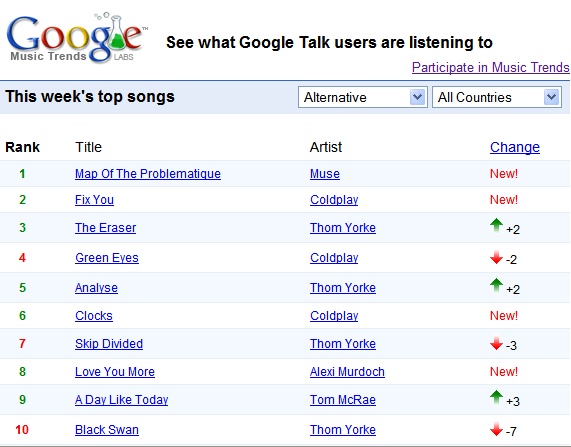
Now that Google Talk 1.0.0.96 is available to public, Google thought it's a good idea to use the songs listened by GTalk users for a new service: Google Music Trends. Every week, you'll see the most popular 20 songs by genre and by country. Currently, only US is an option in the country list.
The service is integrated with Google's music search, so if you click on the artist name you'll find the latest albums and other related information.
The new service is opt-in, so you need to enable it in Google Talk. Go to Settings / Audio and check "Share music listening history with Google Music Trends".
Another interesting side effect is that all the songs played will be included in the Search History, so you can see what you listened last week or how many times you listened to U2. Of course, to record that information, you need to use Google Talk and show the current music track in the status.
A similar ranking can be seen on last.fm, the site that uses plug-ins for music players to send information about the listened songs. The site also shows artist charts, top tracks for an artist and much more. But remember that popularity isn't a measure of value.
Apple's iPod has almost 80 percent of the US music player market, while iTunes has 70 percent of US digital music sales. Other online music stores cannot sell music files encoded with Apple's DRM, and competing devices cannot play these files. With such a dominance, the rest of the competitors had to do something to increase their sales.
Microsoft decided to build their own music player. "Under the Zune brand, we will deliver a family of hardware and software products, the first of which will be available this year," said Chris Stephenson, general manager of market for entertainment and services at Microsoft. "We see a great opportunity to bring together technology and community to allow consumers to explore and discover music together." And, of course, a great opportunity to increase their small sales. Microsoft also has MSN Music Store and Urge, an online music store in partnership with MTV, that sell music for PlaysForSure devices like Zen Vision in WMA format and protected with Microsoft's DRM.
On the other hand, Yahoo thought it would be better to sell MP3s without DRM, not because they care too much about the consumer, but because they want to sell music to iPod users. Their first test is a Jessica Simpson MP3 that costs $1.99 and supports "customization": you can hear your name in the song. They basically do a digital watermarking to prevent file-sharing. The song will include watermarks that store information about the buyer, that's useful if the MP3 is found on a P2P network or on a site. What does Yahoo say? "As you know, we've been publicly trying to convince record labels that they should be selling MP3s for a while now. Our position is simple: DRM doesn't add any value for the artist, label (who are selling DRM-free music every day — the Compact Disc), or consumer, the only people it adds value to are the technology companies who are interested in locking consumers to a particular technology platform. We've also been saying that DRM has a cost. It's very expensive for companies like Yahoo! to implement. We'd much rather have our engineers building better personalization, recommendations, playlisting applications, community apps, etc, instead of complex provisioning systems which at the end of the day allow you to burn a CD and take the DRM back off, anyway!"
Files downloaded from Apple's music store come with Apple's DRM - called FairPlay (isn't that ironic?). Songs are encoded using FairPlay-encrypted 128 kbit/s AAC streams in an MP4 wrapper. Let's see the restrictions of FairPlay: * number of machines allowed to use purchased music within 24 hours: 5 * number of times you can CDs of the same playlist: 7 * only iPod and a small number of Motorola phones (Motorola ROKR E1, Motorola RAZR V3i) can play the files.
One workaround to the DRM is to burn the file to a CD. Another way is to use Hymn, a software that removes FairPlay. "The purpose of the Hymn Project is to allow you to exercise your fair-use rights under copyright law. The various software provided on this web site allows you to free your iTunes Music Store purchases (protected AAC / .m4p) from their DRM restrictions with no loss of sound quality."
Michael Gartenberg, from Jupiter Research, says that "Microsoft is clearly going to face a battle here. It is going to be hard for them to create the same level of cachet that Apple has with the iPod."
Yahoo's project has its own restrictions: "You may transfer a Permanent Download an unlimited number of times to compatible portable devices that adhere to the Usage Rules and security requirements. Once you have transferred a Permanent Download to a compatible portable device, you agree not to copy, distribute, or transfer it from that device to any other media or device." Another issue is that the fingerprints added in the song may raise privacy concerns.
The problem of DRM is far from being solved and the solutions provided by companies like Yahoo and Microsoft aren't going to solve it. I'll conclude with Moby's opinions about file-sharing and an original campaign of David Berlind, ZDNet Executive Editor :
my thoughts on file-sharing? well, as i've said before i'm happy and flattered if anyone makes the effort to listen to my music, regardless of the medium by which it's delivered. i'm glad that the apple i-store exists, because that seems like a potentially healthy way of dealing with this situation, by offering downloads for a fairly reasonable price. and in general i do not support the efforts of the riaa regarding file-sharing. i didn't support them when they cracked down on internet radio (which really wasn't even their stated domain). and i don't support them now that they're cracking down on people who've engaged in file-sharing. i know for a fact that a lot of people first heard my music by downloading it from napster or kazaa. and for this reason i'll always be glad that napster and kazaa have existed. i'm sure that this is not a very popular thing for me to say, but it's the truth. i believe that we're moving towards some sort of resolution, though. and i hope for happy endings for all involved: record companies, musicians, music lovers, record stores, file-sharing sites, etc. everyone just needs to bend a little bit and the situation will be remedied (i.e-supporting your local record store, supporting things like apple's i-store, charging less for cd's, recognizing that file-sharing has served a great promotional value for record companies, musicians not expecting to get rich from selling music, etc). and the riaa certainly shouldn't prosecute people for listening to music. i can understand prosecuting people who copy and sell cd's, but i can't understand prosecuting someone because they love music and have a few illegally downloaded songs on their hard-drive. thanks, moby
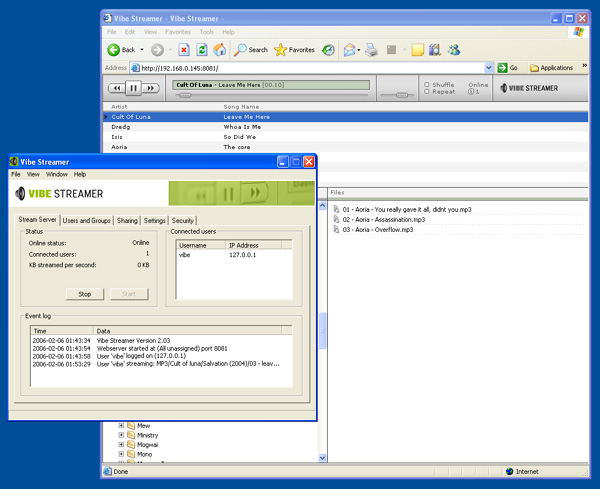
Vibe Streamer is a fun way to share your music with your friends. Although it's basically a file server, you don't have to spend too much time with configurations.
You can add groups to have different settings and other kind of shared music for each group: your co-workers, your friends, your family. After adding groups, you should create usernames and passwords for each person who will listen to your music. If you create an account that will be used by more than one person, change "Max number of users" in settings. Then add your shared directories, select your IP address and start the server. You can now invite your friends to visit http://your-ip-address:8081, replacing your-ip-address with your IP. They can browser the directories, choose the music they like and play it as a stream.
Vibe Streamer's client is a web page that works with any browser, but the server is only available for Windows. Another limitation is that you can share only MP3 files. As all you do is stream the content of the files, your friends won't get the raw MP3s, so you're not doing anything illegal.
Remember to keep the server functioning in order to let your friends listen to the music.
Songbird is an open-source media player based on Firefox, so it's also a browser. The software lets you play music from the web as easy as if it was on your computer. If you go to a site that has links to music, Songbird creates a list of of files you can download or play.
Songbird gives an easy access to radio stations, podcast services like Odeo, network services like last.fm and Creative Commons music.
Songbird can play many music formats including MPEG Audio (mpga), MPEG Layer 3 (mp3), MP4 Audio (mp4a), Ogg Vorbis, Speex, AAC, WMA, FLAC.
The program is currently at version 0.1 and will grow much more when developers will create cross-platform extensions and plug-ins.
These tips will make your Winamp play music louder and with higher fidelity without buying a new sound card, like Creative SoundBlaster.
Install MAD MP3 decoder. MAD represents the decoded audio signal with high precision. It supports MPEG-1 and the MPEG-2 extension to lower sampling frequencies.
Enhancer 017 is the best DSP plug-in for Winamp and it's free. Try "General improvements" preset. Other great presets: "Treble boost", "Party with ambience", "Inside the music".
Although it's outdated, some hardware work better with waveOut output. Go to Options / Preferences / Plug-ins / Output and select waveOut. You can read more about DirectSound vs waveOut.
If I want to see an excellent music video, this page is gold for me. The page is maintained by Ivar Hagendoorn, an internationally acclaimed choreographer, photographer and researcher. You'll find music videos directed by Spike Jonze, Chris Cunningham, Jonathan Glazer and Michel Gondry.
Some excerpts: "Jonathan Glazer has directed some of my favourite music videos: Radiohead Karma Police and Street Spirit, Jamiroquai Virtual Insanity, UNKLE Rabbit in your headlight, and Massive Attack Karmacoma. In 2001 he completed his first full-length movie, Sexy Beast. I just loved the scene where the rock rolled down from the mountain into the swimming pool. He also directed the Levis commercial with the guy and girl running through walls."
amaroK is the best music player you'll ever meet and chances are you haven't met it because amaroK is available only on Linux. Until amaroK is ported to Windows, you can try it on amaroK Live, which is a PCLinuxOS Live CD that includes basic applications, amaroK and free music licensed by Magnatune, a music label that has learned something from the open source software.
So all you have to do is burn the ISO image on a CD (350 MB), restart the computer and boot from the CD. This Live CD works on my laptop so it's likely it will work on any decent computer.
OK, but what's so special about amaroK? It's a music player, right? Yes, but it's a music player that does everything with grace. It shows you recent played tracks, your favourite tracks. For every song, amaroK finds similar tracks, lyrics, tags and information about the artist. It integrates with last.fm, it lets you create scripts in Python (to create an alarm that plays music to wake you up) and it has a dynamic mode that feeds similar music to your playlist automatically.
amaroK supports crossfading, CD burning, iPod, iRiver iFP and USB devices with VFAT and podcasting. Oh, and it looks extremely good.
If Google made a media player, how it would be different?
* The media player would be small and dockable. It would have four buttons: play, pause, stop, shuffle and a search box.
* Google Media Player would find lyrics for your songs using Google search engine.
* It would fill the tags with the artist, the song, the album and the genre of each song.
* Each song would have a mood (like sad, happy, romantic, sleepy).
* Google Media Player's equalizer would adjust according to song's genre.
* You would be able to share your media library, playlists or stats with your Gmail contacts or the whole world.
* Google Media Player would suggest what other songs to listen.
* Google Media Player could play contextual music: let's say you read a novel by Gabriel Garcia Marquez on your computer. Feed Google Media Player a fragment from the novel and let it find the most appropriate songs from your computer or from online streams.
* Google Media Player would show the latest news from the artist that plays the current song, images from Google Images or what other people think about this song.
* Google Media Player's search functionality would be complex. If you search for "Bjork", you'll also find artists with similar music or artists influenced by her music.